
TikTok audio · iPhone & iPad
Make a TikTok audio
without an editing app.
Speed the song up or slow it down on a file you already own, then render it at 1080×1920 so it arrives the right shape instead of being cut to it.
Free renders the whole song. Pro removes the corner mark. Nothing is uploaded.
- the 9:16 canvas
- 30 fpsH.264 in an MP4
- the slowed and sped up presets
Two different things get called a TikTok audio
One of them is a file. The other is the post itself. Same app, different job.
The first is a sound meant to sit under somebody else’s footage: a song cut to its hook, pushed up or pulled down in speed, exported clean and dropped into an editor. That is a file problem, and the edit audio guide covers it end to end.
The second is the post. Nothing is being cut over it. The song is the content, a picture holds the screen for its whole length, and it is uploaded as a video only because a feed will not accept an audio file at all.
That second one is this page. The part people get wrong there is not the sound; it is the frame, and no amount of work on the tempo repairs a badly shaped one.
The shape is something you render, not something you crop
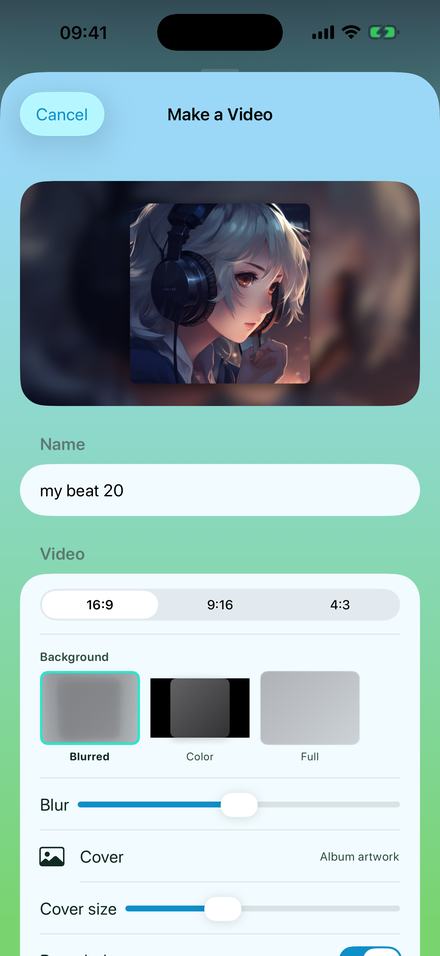
Y2K Player builds the frame at its finished size from the first pixel, which is why the choice sits above the render button.
The shape control offers three canvases and they are literal. 16:9 renders 1920×1080. 9:16 renders 1080×1920. 4:3 renders 1440×1080. Choosing 9:16 does not cut a wide frame down; it composes a tall one, and every measurement in that composition — the card, its corner radius, the shadow under it, where the corner mark sits — is scaled to the canvas you picked.
Compare that with trimming afterwards. A 9:16 slice out of a 1920×1080 render is about 608 pixels wide, and has to be stretched back up to 1080 to fill a phone. Every edge in it is softer than it was.
Most of a vertical frame is not the cover
A square picture inside 1080×1920 leaves more empty frame than filled. Four controls decide what that emptiness looks like, and one changes behaviour the moment you go vertical.
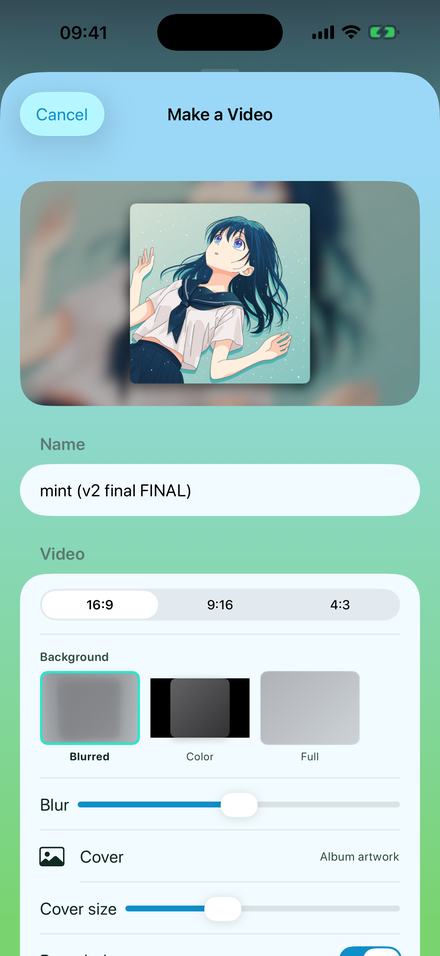
Cover size runs from 0.45 to 1.5 and is measured against the frame’s height. On a wide canvas the height is the short side, so the whole range behaves politely. On 1080×1920 the height is the long side, and a square cover already touches both edges at 0.5625 — nine sixteenths — so most of the slider’s travel is spent pushing artwork off the sides. If the picture lost its margins the instant you went vertical, that is why.
Blur sets the field behind the card, 0 to 100. At 0 the background is a sharp enlargement of the same picture and the two argue; far up, the colour drifts toward grey. Either way a dark wash at 28% goes over the backdrop before the card lands, which is what stops a pale cover washing out its own edges.
Rounded corners and Drop shadow separate the card from its blurred twin. Switch both off and the artwork reads as printed onto the background rather than resting on it.
Full removes the card: the picture fills the canvas and is cropped to it, and Position slides the crop’s focal point from −1 to +1 along whichever axis overflowed — vertically, that is how a face stops being cut off at the chin.
Making one, start to finish
A few minutes on a song already on the phone, most of it spent on the percentage rather than the picture.
- Get the song inTap Add and pick an audio file, or share one in. A video works too — the app takes the audio out of it.
- Set the speedOn the Speed tab, drag Tempo. With the link on the key rides with it, which is what makes an edit sound like one.
- Open Export, then VideoThe sheet leads with a live preview of the exact frame that will render, so every control below edits a picture you can already see.
- Pick 9:16 firstShape before anything else. The preview reshapes, and a cover size that suited a wide frame will be too large here.
- Choose the pictureAlbum art is the default. Tap Cover for any photo, a GIF, or a short clip that loops under the whole song.
- Render itLeave the phone alone until the bar finishes. The MP4 saves itself to Photos; Files and the share sheet take it from there.
What a free render gives you, and what it holds back
- The whole song. A video export is never cut to a preview length on either tier: a six-minute track renders as a six-minute file.
- A small mark, top right. White at 82% opacity with a soft shadow under it. Its line changes every 20 seconds across a 0.8-second crossfade, and when the remix genuinely bends the song, one of those lines says so.
- Pro removes it — or keeps it. Some people want the credit on the post, so it is a switch rather than a rule.
- Sound quality differs. A free video’s audio is written at 128 kbps. Pro chooses between 128, 256 and 320.
- Effects are Pro. Speed and pitch are free and render exactly as set; the rack is switched off for a free export, so a free slowed video is slowed but dry.
- Audio files are never marked. Not at any tier. A tone laid over music would make the file worthless, so it does not exist.
Sped up or slowed is one tap before the sheet opens
The preset row sets the speed, the pitch link and the effect rack together, and everything it touched is still a slider afterwards.
Sped Up is 1.25× with a five-band EQ tilted upward: −1, 0, 0, +2, +3 dB. Slowed + Reverb is 0.85× with the reverb mix at 34 and the stereo width at 60. Nightcore is 1.35×. Chopped screws the song to 0.72× and lets it trip over the beat. Each clears the rack before it sets anything, so last night’s distortion is not still running under this morning’s choice.
Wherever you land, the export runs the same chain the player was running, node for node and in the same order, so the file matches the version you auditioned rather than approximating it.
Why a still cover finishes so much faster than a moving one
Two encoders sit behind one button, and which one runs depends on whether your picture moves.
A still cover produces a video in which almost nothing changes, so almost nothing is encoded. A frame stays on screen until the next one claims a timestamp, and the only moments needing new frames are the seconds where the corner mark is crossfading. For a three-minute song that is on the order of 250 encoded frames rather than 5,400.
A moving cover is the opposite: every frame differs from the last. One cycle of the loop is encoded, then stitched end to end under the audio without being encoded again. Moving covers also get more bitrate, because motion at a still’s bitrate goes blocky within seconds. A cover clip loops for 2 to 30 seconds, and its own sound is ignored.
Either way the work happens on the phone. Nothing is uploaded and nothing queues, so the render runs in airplane mode and the finished MP4 lands in Photos by itself.
Questions about the vertical export
The ones that come up while the sheet is already open.
What size should a TikTok audio video be?
9:16, and here that means a real 1080×1920 render rather than a wide frame cropped down afterwards. The shape is chosen in the export sheet before rendering starts, and the app composes the whole frame at that size. It is also remembered, so the next export opens on the shape you used last.
Can I use a song from Spotify or Apple Music?
No. Y2K Player works on audio files already on the device — imported from Files, shared in from another app, or pulled out of a video you own. Tracks downloaded inside a streaming subscription are locked to the app that downloaded them, and nothing here can open them.
Is there a watermark on the video?
On the free tier there is a small mark in the top-right corner at 82% opacity, whose line changes every 20 seconds. The video runs the full length of the song either way. Pro removes the mark and can switch it back on. Audio exports carry no mark at all, on any tier.
Why did my cover overflow when I switched to 9:16?
Cover size is measured against the frame’s height, and on a vertical canvas the height is the long side. A square cover reaches the left and right edges at 0.5625, so a value that looked right at 16:9 pushes past them at 9:16. Drag Cover size left and watch the preview redraw.
Can the background move instead of being a still?
Yes. Tap Cover and pick an animated GIF or a video clip; the clip loops under the whole song and its own sound is ignored. Loop length is adjustable from 2 to 30 seconds. Moving covers take longer to render than stills, and are encoded at a higher bitrate so the motion does not go blocky.
Do I need Pro to post a sped up video?
No. Speed and pitch are free, and a free video export runs the whole song. Pro removes the corner mark, unlocks the effect rack — reverb, EQ, distortion, stereo width and the rest — and lets you choose the audio bitrate.
How does the finished video reach the feed?
The MP4 saves itself into Photos when the render finishes, so it sits in the camera roll like any other video and every upload flow can see it. There is also a Save to Photos button and a share sheet, if you would rather send it somewhere directly.
Where to go next
- Try it in your browserFree in your browser — make the audio, export it, post itOpen →
- Make a slowed and reverb videoThe same export in all three shapes, and what each background does.Open →
- Audios for editsThe other route: a clean file for somebody else’s timeline.Open →
- Sped up songsWhere 125% puts the key, and the rest of the speed table.Open →
- Slowed and reverbThe room behind the slowed sound, and how much of it to use.Open →
Render one and look at it on a phone.
Open a track you already own, put the speed where you want it, and export it at 1080×1920. Free to use. Pro is one payment — forever.
Free to download and keep. Pro is a one-time purchase — buy it once and it never renews.