
Tempo & key · iPhone & iPad
The BPM is on screen.
The key moved with it.
Y2K Player measures the tempo of the files you already own, shows it while the song plays, and says in semitones exactly how far the speed has bent the key.
Free to use. Pro is one payment — forever.
- Measured on devicenothing is uploaded
- Reads livethe figure follows the speed
- Silent when unsureno guess dressed as a fact
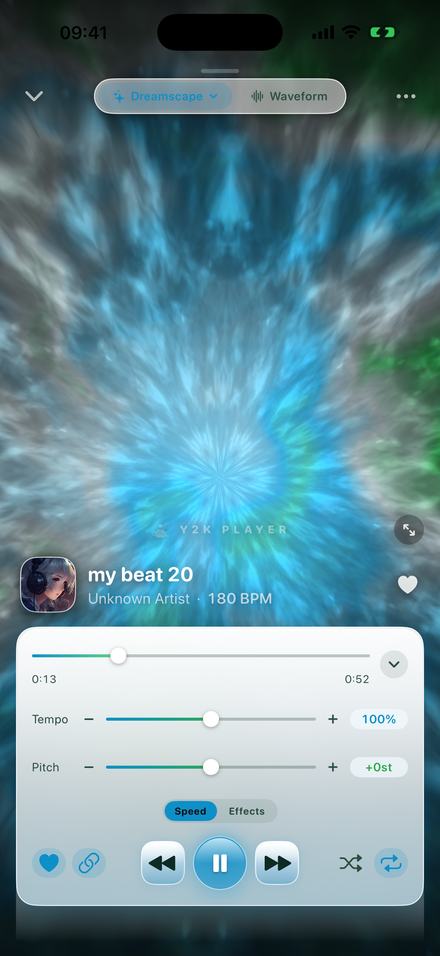
The tempo sits under the song title
Not in a menu, not behind a button. On the artist line, while the track plays.
Open a song and the line beneath its name reads something like Unknown Artist · 180 BPM. It follows the track onto the waveform screen and the small player above the tab bar.
That number is not the file’s tempo. It is the tempo you are hearing right now — the measured tempo multiplied by the speed you have set. At 100% the two are the same; at any other setting the readout follows the slider rather than the file.
Settings has a switch if you would rather not see it. And when the app could not work a tempo out, there is no line at all: the artist stands alone, and the gap is never filled with a guess.
How the tempo is worked out
On the device, from the audio itself, with nothing sent anywhere.
There is no lookup. Nothing is matched against a database of releases, so it works on the rough mix you bounced last night as readily as on a single, and in airplane mode. Measuring starts when a file is imported, in the background, two files at a time.
Up to seventy seconds are read from a point inside the file rather than from the top, because intros lie. That audio is split into three frequency bands and turned into a record of where the sound suddenly got louder. The kick gets no vote on how fast the song is — it often marks only every other beat, and would halve the answer — so the mids and highs decide. Every tempo from 58 to 215 beats per minute is scored, and the winner snaps to a whole number when it lands within a third of one: produced music sits on whole BPMs, and one out walks a grid out of time within a few bars.
The range is wide at the top deliberately: sped‑up and nightcore edits live between 160 and 210.
It also finds beat one
A tempo alone is half an answer. The same pass finds how many seconds into the file the first downbeat lands — almost never 0:00, given intros, count‑ins and encoder silence. That is why the bar lines across the waveform sit on the record’s own bars instead of a grid that starts at the top of the file and agrees with nothing.
When it refuses to answer
The blank space is a decision. No number beats a wrong number.
- Under twenty seconds. Too little audio to be sure of.
- Twelve minutes and over, never. A DJ set or a multi‑track mix changes songs partway through, and one figure for an hour of different records would be a lie.
- Long songs must agree with themselves. Anything past three minutes and twenty seconds is read twice, from two different places. If the readings differ by more than five percent, nothing is written.
- No clear pulse, no number. The winner has to tower over everything else considered, by more than four times the average across the range. Ambient, free time and an a cappella land under that bar, as intended.
- One honest failure stays. Some records carry two true pulses at once, a three‑against‑two feel over a straight one. Whichever dominates is reported — sometimes half or double what a producer would call the tempo.
Finding the BPM of a song on your phone
Nothing to configure. The work is already done by the time you look.
- Get the file inImport an audio file, or share one into Y2K Player from wherever it lives. Measuring starts on import, in the background, two files at a time, so the figure is usually sitting there before you have finished scrolling to it.
- Open the songThe tempo is on the same line as the artist, under the title, in whole beats per minute. The waveform screen and the small player above the tab bar carry the same figure.
- Read it at 100% firstThe number shown is the tempo you are hearing, not the tempo of the file. Leave the speed at 100% if what you want is the song’s own tempo.
- Move the speed and watch itEvery step of the Tempo slider multiplies the figure. 85% of a 128 BPM record reads 109; 125% of a 118 reads 148. Steppers move in fives, the slider covers 50% to 150%.
- Read the semitones beside itWith the link on, the Pitch readout is how far the speed has moved the key. Tap the minus or plus next to Pitch to land on a whole semitone instead of between two notes.
Change the speed and the BPM changes with it
It is multiplication, and the screen does the sum while you drag.
Set Tempo to 125% and a 118 BPM file reads 148. Pull it to 85% and a 128 BPM file reads 109. That is the whole mechanism — but on screen it turns “faster” into “make this 150”.
It runs backwards too: divide the tempo you want by the tempo the song already is. A 92 you want at 138 wants 150%; a 174 you want at 87 wants 50%.
The presets are marked points on that same line. Slowed + Reverb is 85%, Lo‑Fi is 92%, Sped Up is 125%, Nightcore is 135%, Chopped is 72% — one tap turning a 140 BPM track into 119, 129, 175, 189 or 101.
Speed runs from 25% to 200%: the slider covers 50% to 150%, and the minus and plus buttons step five points at a time to reach the rest.
And what all of that does to the key
This is the half most people are actually asking about.
By default, speed and key are one thing. The link — the chain button in the transport row — is on, and the app behaves like tape: faster and everything rises, slower and everything falls. Not an effect stacked on top, just what a recording does read at a different rate.
How far it moves is fixed arithmetic. Doubling the speed lifts the record by exactly one octave, an octave is twelve semitones, and any other speed shifts it by twelve times the base‑two logarithm of that speed. The app runs the sum continuously beside the Pitch slider: 85% reads −2.8st, 125% reads +3.9st, 135% reads +5.2st.
The app does not name the key — on purpose
There is no key detection in it and none is claimed. What you get is the interval — the part that is arithmetic rather than an estimate, and the part you need. If the song was in F, +3 puts it in A♭ and −2 in E♭. The twelve run C, C♯, D, D♯, E, F, F♯, G, G♯, A, A♯, B.
Which exposes something the readouts make obvious. −2.8 is not a key; it sits between two notes, and a song at 85% is in no key at all in the sense a musician means it. To land somewhere real, use the minus and plus buttons beside Pitch: they step in whole semitones, and with the link on they move the speed to the exact ratio that produces one. Three semitones down is 84.1%, not 85%.
For one without the other, switch the link off. Tempo then changes speed and length with the key untouched, and Pitch moves the key alone, twelve semitones either way. The BPM readout does not budge, because pitch by itself never changes how fast anything is.
One measured tempo. Three settings.
Everything on screen moves off the same figure.
100% · 180 BPM 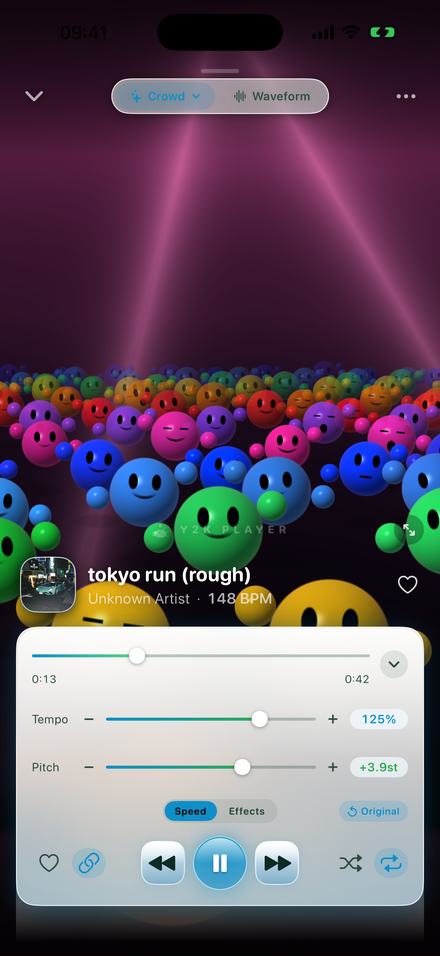
125% · +3.9st 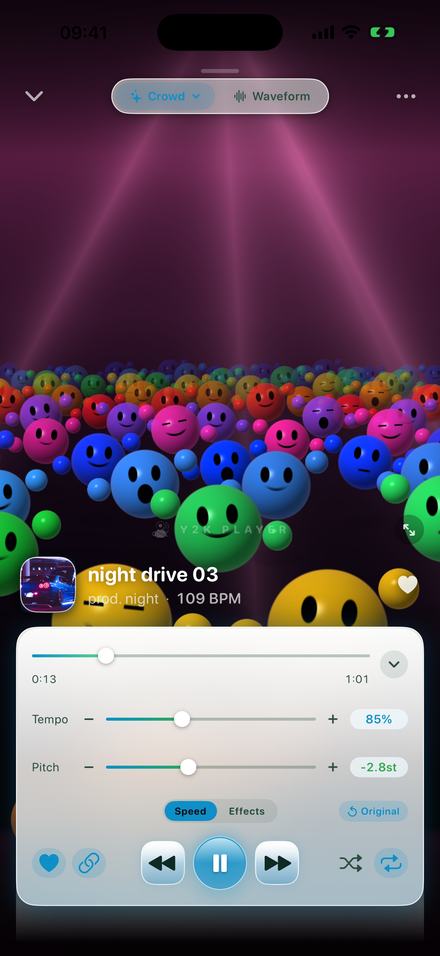
85% · −2.8st 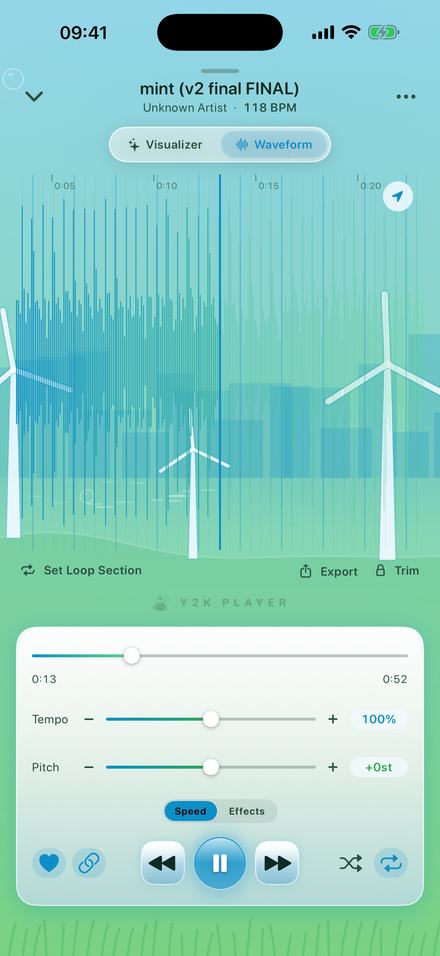
On the waveform too
Worth knowing first
- It measures files you already own. Import them from your phone, a computer or a share sheet. Nothing here streams.
- Speed and key cost nothing on any track, at any setting. The effect rack is the part that is Pro.
- Nothing is uploaded to be identified, which is why it works offline, and on unreleased music.
- It reports a tempo, not a key. The semitone figure says how far the key moved; naming where it landed is yours.
- Some songs get no number — the intended answer, not a bug.
Questions about tempo and key
Mostly asked when the number on screen is not the number somebody expected.
How does the app work out the BPM?
It listens to the file. Up to seventy seconds are read from a point inside the track, split into three frequency bands and turned into a record of where the sound suddenly got louder. Every tempo from 58 to 215 beats per minute is scored against that, and the winner is snapped to a whole number. It happens on the device, in the background, when the file is imported.
Is the tempo looked up online?
No. Nothing is matched against a database of released records and nothing leaves the phone, which is why a figure appears for a rough mix you exported yourself, and why one appears in airplane mode.
Why does one of my songs show no BPM at all?
Because it could not be sure. Nothing is reported for files under twenty seconds, nothing for anything twelve minutes or longer, and nothing when the pulse never towers over the rest of what was considered — ambient, free time and a cappella recordings usually land there. Songs past three minutes and twenty seconds are also read twice from two different places, and if those two readings disagree by more than five percent nothing is written. The blank is the intended answer.
Why does the BPM change when I move the speed slider?
Because the figure on screen is the tempo you are hearing, not the tempo of the file: the measured tempo multiplied by the speed. At 125% a 118 BPM file reads 148. Put the speed back to 100% and it reads 118 again.
Does the app tell me what key a song is in?
No, and it does not pretend to — there is no key detection in it. What it gives you is the interval: the Pitch readout says exactly how many semitones the speed has moved everything, which is the part that is arithmetic rather than an estimate. If you know the original key, add or subtract that number.
What does slowing a song to 85% do to its key?
It lowers everything by 2.8 semitones, which is what the readout shows. That is not a key — it sits between two notes. To land on a real one, tap the minus button beside Pitch: it steps in whole semitones and moves the speed to the exact ratio, so three semitones down is 84.1%.
Can I change the key without changing the speed?
Yes. Switch the link off — the chain button in the transport row — and Pitch moves on its own, twelve semitones down to twelve up, with the length of the song untouched. The BPM readout does not move, because pitch alone never changes how fast anything is.
Can I change the speed without changing the key?
Also yes, and it is the same switch. With the link off, Tempo changes speed and length while the key stays where it was.
The number looks like half, or double, what I expected.
That happens, and it is the honest failure of any tempo detector. Some records carry two true pulses at once — a three-against-two feel laid over a straight one — and whichever dominates the audio is the one reported.
Does it show a BPM for a DJ mix or a long set?
No. Anything twelve minutes or longer is never measured, because a set changes songs partway through and a single figure for an hour of different records would be worse than none.
Can I see where the bars are?
Yes, on the waveform screen. The same pass that finds the tempo also finds how many seconds into the file the first downbeat lands, so the bar lines sit on the record’s own bars rather than on a grid that starts at 0:00.
Can I hide the BPM?
Yes. There is a switch for it in Settings, and turning it off leaves the artist line as it was.
Is any of this part of the paid version?
No. Speed, pitch and the tempo readout are there on every track from the start. Pro is the effect rack, the whole catalogue of looks and exports with nothing left on them.
Where to go next
- Try it in your browserThe free browser tools — speed and pitch, live on your fileOpen →
- Slowed + reverb85%, and what that setting does to a record.Open →
- Nightcore135% with the key riding up behind it.Open →
- Sped up125%, and how to aim it at a target tempo.Open →
- Works offlineWhy the measuring needs no connection at all.Open →
Put a song on and read the number.
It measures on your phone, from files you already have, and nothing needs an account.
Free to download and keep. Pro is a one-time purchase — buy it once and it never renews.