
Tempo & pitch · iPhone & iPad
Speed up any song.
It takes one tap.
On the files already on your phone, with the pitch riding up with the tempo or staying exactly where it was.
The speed slider is free. No account, no upload, no watermark on audio.
- One tapand it is already playing
- No waitingnothing renders first
- Your own filesnothing is uploaded
What “sped up” means, and why some of them sound wrong
There are two completely different ways to speed up a song, and the one you pick decides whether it sounds like the version people share or like a chipmunk.
The first is the turntable method. Everything is played faster, so everything also gets higher: the tempo and the key rise together, locked, by the same ratio. This is the sound of almost every sped up edit you have heard. It is also the reason those versions feel brighter and more urgent rather than merely quicker — the whole track has moved up in key.
The second is time-stretching. The audio is chopped into overlapping grains and packed closer together, so the song finishes sooner while every note stays exactly where it was. It is the right method for practising, for fitting a track to a fixed runtime, and for anything where the key has to survive. It does not sound like a sped up edit, because the voice does not change.
Both live behind the same slider here, and the difference is one switch. The linked behaviour is on by default, because that is the one people are looking for. It is also why one app can make sped up songs, slowed ones and nightcore: the method never changes, only where you leave the slider.
How far the key moves
With the link on, the pitch follows the tempo on a fixed curve — twelve semitones per doubling of speed. That gives some numbers worth knowing.
| Tempo | Pitch | What it sounds like |
|---|---|---|
| 110% | +1.7 st | Noticeably livelier; most listeners could not name what changed |
| 120% | +3.2 st | Clearly an edit, still comfortable |
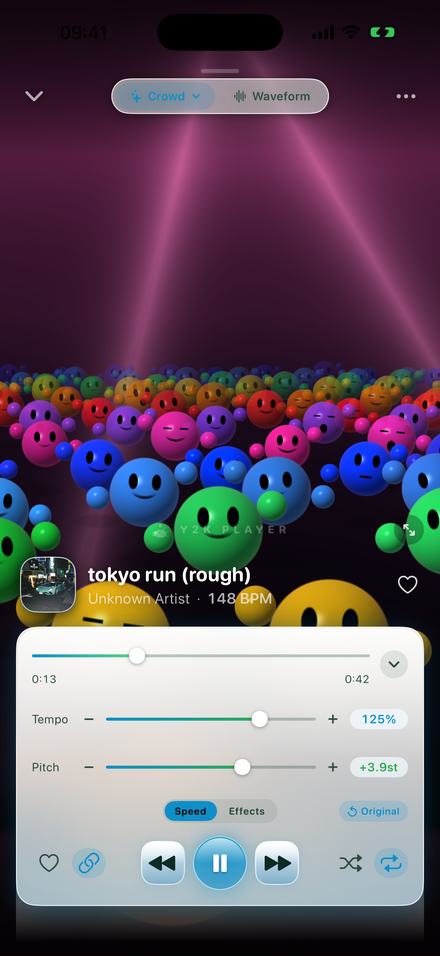
| 125% | +3.9 st | The standard sped up sound, and the app’s preset |
| 130% | +4.5 st | Bright and pushing |
| 135% | +5.2 st | The nightcore range |
| 150% | +7.0 st | A perfect fifth up — the vocal has clearly changed character |
| 200% | +12.0 st | A full octave. The top of the range |
How to do it
A couple of minutes, most of it spent finding the percentage you like.
- Add the fileTap Add, or share an audio file into Y2K Player. Whole folders work, and so does a video file — the app pulls the audio out of it.
- Raise the tempoOn the Speed tab, drag Tempo to the right. The readout updates as you drag and the song speeds up under your finger; nothing is rendered first.
- Decide about the pitchWith the link on, the pitch rises with the speed the way a record does — at 125% that is 3.9 semitones up. Switch the link off and the song gets faster while staying in its original key.
- Fine-tune itThe buttons either side of the slider step in 5%. Turn on fine control steps in Settings and the slider moves in 1%, so 118% is as reachable as 120%.
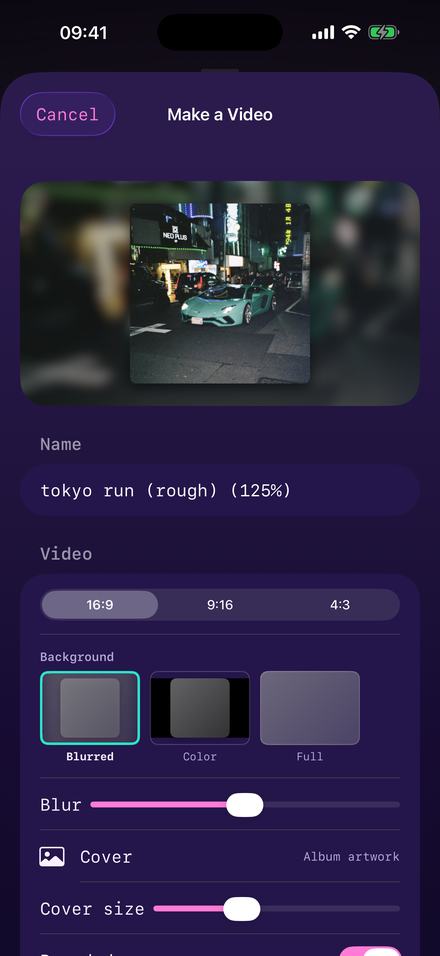
- Export itExport writes an M4A or a WAV with the speed baked in, named after the song and the percentage. Export to video renders a full-length MP4 instead.
The file comes out named after what you did to it
A small thing, and it is the difference between a folder you can use and a folder of identically-named exports.
Named before you have typed anything
The name arrives as the song title with the speed appended, so the export is self-describing. It is editable if you want something else, but the default is the one you would have typed.
Audio comes out as M4A or WAV. Both carry the artwork, both are accepted by every editor and every upload flow, and neither has a watermark on it — audio exports are never marked, on any tier.
There is no MP3 option, and that is a platform limitation rather than a choice: iOS ships no MP3 encoder. In practice nothing that accepts an MP3 refuses an M4A.
One tap puts it back
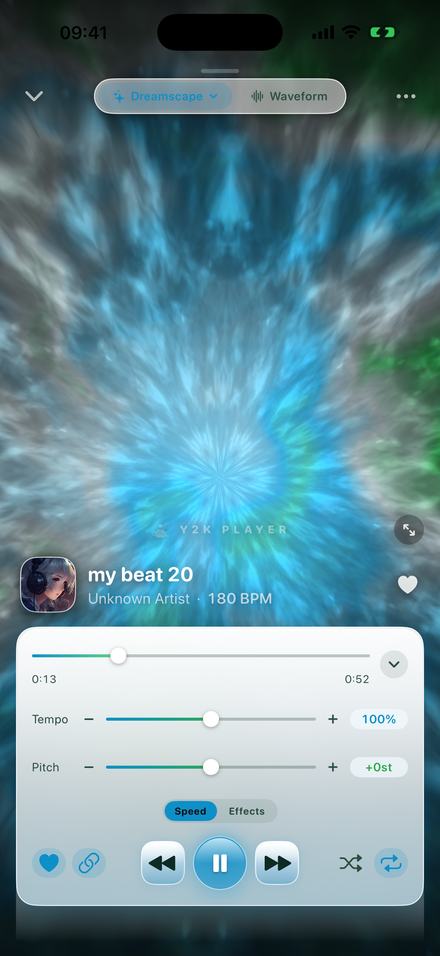
Every song keeps its own tempo and pitch, so a sped up track stays sped up next time you open it and everything else in the library is untouched. The Original button resets that one song to the way it was recorded.
Nothing you do here is destructive. The file you imported is copied once and then only read; the speed is a number stored beside it, not a rewrite of the audio.
Which speed to actually use
Between 110% and 120% if the song is already fast. A busy track at 130% loses its groove; the individual hits stop being separable and the whole thing turns into texture.
125% is the default for a reason. It is far enough that the change is obviously deliberate, and close enough that the song is still recognisably itself. The built-in Sped Up preset uses it, and it also lifts the top of the EQ slightly so the extra brightness sounds intended rather than accidental.
135% and above is nightcore territory, where the voice changing character is the point rather than a side effect. That has its own page, because it is a different thing being made for a different reason.
Turn the link off if the song has a prominent vocal you do not want altered, or if you are speeding something up to fit a runtime rather than to change how it sounds.
The tempo is printed under the title, and it is useful
Every track shows its detected BPM beside the artist name. That number is what turns “how fast should this be?” from a feeling into arithmetic.
Multiply the original by the percentage and you have the tempo you are about to create. It is worth doing once, because the same 125% is a different decision on a slow song than on a fast one.
| Original | At 110% | At 125% | At 135% |
|---|---|---|---|
| 70 BPM | 77 | 88 | 95 |
| 90 BPM | 99 | 113 | 122 |
| 110 BPM | 121 | 138 | 149 |
| 130 BPM | 143 | 163 | 176 |
| 150 BPM | 165 | 188 | 203 |
| 174 BPM | 191 | 218 | 235 |
Roughly 90 to 140 BPM is where most music stays danceable and legible. A 150 BPM track at 125% is 188, which is past the point where a listener can follow individual hits — the snare stops being a snare and becomes a texture. That is why slower source material takes the treatment so much better, and why the good sped up edits are almost always of songs that started around 80 to 110.
The detected tempo is doing real work elsewhere too: the beat-locked effects in the rack — the chop, the rewind, the stutter — land on the grid because the app knows where the grid is. Without that they would fall wherever they felt like, which is exactly what makes those effects sound like a plugin instead of a person.
Worth knowing
- The speed and pitch sliders are free. No trial, no counter, no watermark. Play your whole library sped up if you want to.
- Free audio export writes the song’s first 30 seconds. Pro exports the whole thing. Video export is full length on both tiers.
- Effects are part of Pro. The Sped Up preset touches the EQ, so on the free tier you get the speed change without the EQ lift.
- Very large speed changes will show artefacts when the link is off. Time-stretching is maths, not magic; past roughly ±25% without the pitch moving, busy material starts to sound processed.
- No MP3 export, because iOS has no MP3 encoder. M4A and WAV instead.
Questions about speeding songs up
The ones that come up before anybody installs anything.
What speed is a sped up song?
125% is the common answer and it is what the built-in preset uses. Edits generally live between 110% and 135%; above that the vocal changes character enough that most people would call it nightcore.
Does the pitch go up when I speed a song up?
It does if the link is on, which is the default, because that is what a sped up edit sounds like. At 125% the pitch lands 3.9 semitones up. Turn the link off and the song gets faster in its original key.
Can I speed a song up without it sounding like a chipmunk?
Yes — switch the tempo and pitch link off. The tempo then changes on its own and the key stays put. Keep the change modest and it is close to inaudible as processing.
How fast can it go?
The slider covers 50% to 150%. The buttons either side step past that in 5% increments, to 25% at the bottom and 200% at the top.
Can I set an exact percentage?
Yes. The buttons either side of the slider move in 5%. Switch on fine control steps in Settings and the slider itself moves in 1%, so 118% is as easy to hit as 120%.
Will the exported file actually be sped up?
Yes. The export is rendered through the same engine you were listening to, so the speed, the pitch and any effects are baked into the file rather than stored as instructions.
Is there a watermark on the audio?
No, and there never will be. A tone over somebody’s music would make the export worthless. The free limit on audio is length, not a mark.
Can I get the file into an editing app?
Yes. Export writes an M4A or a WAV into Files or straight out through the share sheet, and both formats are accepted by every editor.
Does it work offline?
Completely. No account, no server, no sync. Airplane mode changes nothing.
Can I speed up the audio from a video?
Yes. Import the video file and the app extracts the audio; from there it behaves like any other song.
Does it change my original file?
No. The import is copied into the app’s own storage and then only read. The speed is a setting stored beside the song.
Can I make a video of the sped up version?
Yes — the same export sheet renders a full-length MP4 in 16:9, 9:16 or 4:3. That is covered on the video page.
Where to go next
- Try it in your browserFree in your browser — the sped up version, playing in secondsOpen →
- NightcoreWhere speeding up stops being an edit and becomes a genre.Open →
- Slowed and reverbThe same slider the other way, with a room around it.Open →
- How to make audios for editsCutting to the hook and getting a clean file out.Open →
- Turn it into a videoCover art, blurred background, full length, no editor.Open →
One slider, and you hear it move.
Free to download, free to use on every song you own. Pro is one payment if you want the effect rack and full-length audio exports.
Free to download and keep. Pro is a one-time purchase — buy it once and it never renews.