
Guide · about five minutes
Cut to the hook.
Set the speed. Export.
The three steps behind almost every edit audio, and how to do all three on the phone without a watermark landing on the file.
Audio exports are never watermarked, on any tier. Free exports stop at the song’s first 30 seconds.
- Cut to the hookthe part people actually hear
- Set the speedsped up or slowed
- M4A / WAVwhat comes out
The short answer
An edit audio is a song trimmed to its most recognisable few seconds and re-pitched by speed — usually up around 125%, sometimes down around 85% — then exported as a clean file to sit under someone else’s video. Three operations: cut, speed, export. Everything else is taste.
The reason it looks harder than it is comes down to tooling. The cut usually happens in one app, the speed change in another, and the export in a third, with a watermark or a length cap appearing somewhere in the chain. Doing all three in a music player removes the round trip, and the rest of this page is the version where nothing is uploaded and nothing gets stamped.
Step by step
About five minutes end to end, most of it deciding where the hook starts.
- Get the song onto the phoneImport the file, or share it into Y2K Player. If the only copy you have is inside a video, import the video — the app pulls the audio out.
- Find the hook on the waveformSwitch the player from Visualizer to Waveform. The whole track is drawn out, so the drop, the chorus and the quiet part before it are visible rather than something you scrub for.
- Trim to the part you needTrim sets where the track starts and ends. An edit almost never wants the intro, and trimming first means every later decision is about the part that matters. One thing to know before you rely on it: a free export ignores the trim and writes the song’s first 30 seconds, so a hook further in needs Pro.
- Set the speedSped up sits around 125%, slowed around 85%. With the pitch link on the key moves with the speed, which is what makes both sounds recognisable. Turn the link off if the vocal has to stay where it is.
- Loop it and listen onceSet a loop over the section and let it go round twice. Almost every bad edit audio is one that was exported after a single listen at the wrong speed.
- Export a clean fileExport writes M4A or WAV, named after the song and the speed, with no watermark on any tier. Pro writes the trimmed range at full length; free writes the song’s first 30 seconds. Drop it into Files or send it straight to your editor from the share sheet.
The speeds people actually use
Two clusters, and the numbers are not arbitrary — each one puts the key somewhere specific.
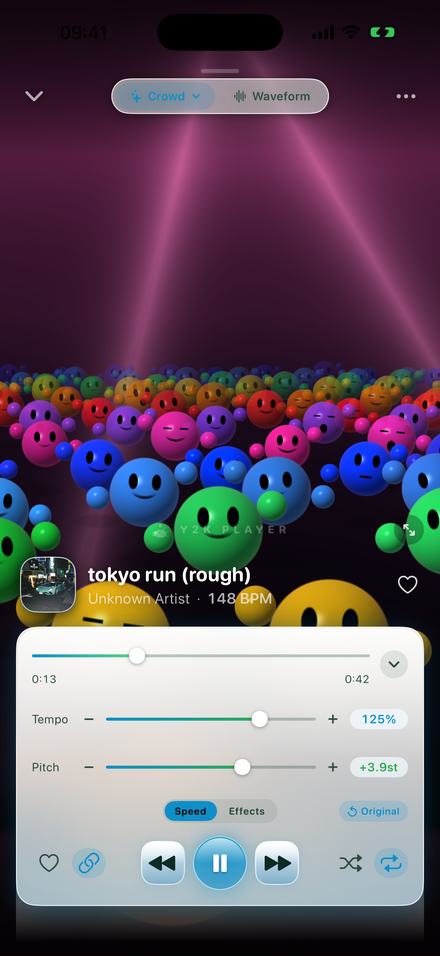
The sped up cluster: 110% to 135%
125% is the centre of gravity. It lands the key 3.9 semitones up, which is enough that the vocal reads as brighter and lighter without becoming a novelty.
110% to 120% is the range for songs that are already fast — past that the individual hits stop being separable and the groove turns into texture.
135% and up is where it becomes nightcore rather than an edit. That is a different intent and it has its own page.
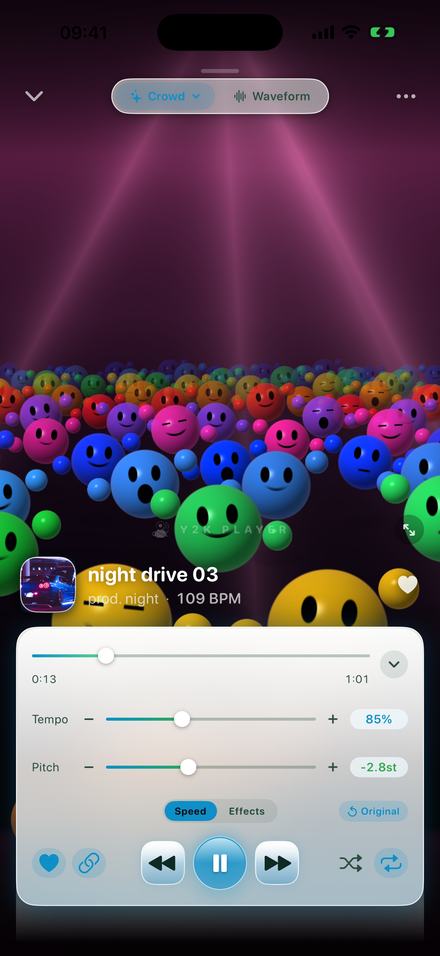
The slowed cluster: 80% to 90%
85% is the standard, dropping the key 2.8 semitones. It is heavier and darker rather than simply later, because the pitch came down with the tempo.
Most slowed edits also have reverb on them — a long room is half of what makes that sound. The slowed and reverb page covers the six rooms and which to use.
Below 75% it stops being an edit and becomes daycore, where the changed voice is the whole point.
The mistakes that make an audio unusable
Cutting in the wrong place. A hook that starts a beat late is the single most common problem, and it is invisible until the audio is under a video. Use the waveform and put the start on the transient, not next to it.
Speeding up a song that was already fast. 125% on a 90 BPM track is gorgeous. 125% on a 150 BPM track is 187 BPM and the drums stop being separable.
Leaving the pitch link off by accident. Time-stretched audio at 125% sounds like the original song in a hurry. The key moving is what makes an edit sound like an edit.
Exporting after one listen. Loop the section twice at the speed you chose. The second pass is where you notice the tempo is a few percent too high.
Accepting a watermark. An audible tag over music makes the file worthless for editing. Audio exports here are never watermarked on any tier — the free limit is length, not a mark.
Rendering the same audio twice. Every re-encode costs quality. Set the speed and the trim before exporting, not afterwards, so the file is written once.
If what you want is a video, not a file
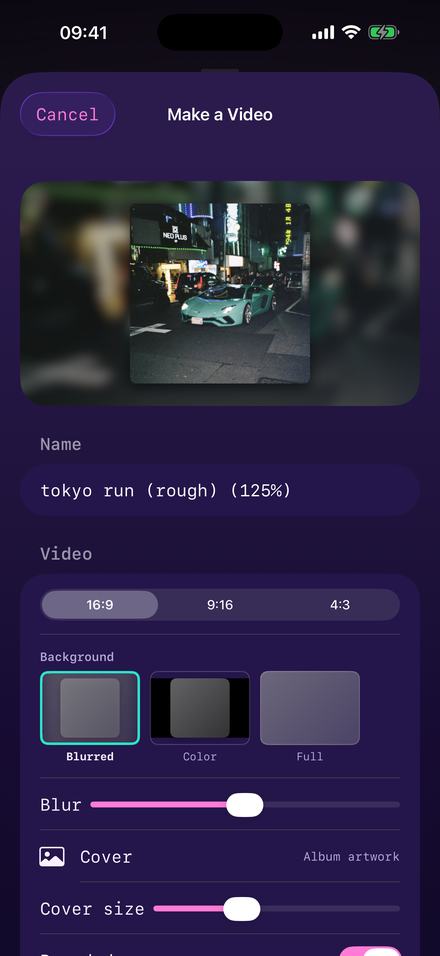
Sometimes the audio is the whole post rather than a layer under someone else’s footage — artwork on screen, the slowed version underneath, uploaded as a video because the platform only takes video. That is a different export, in the same sheet: a full-length MP4 at 1080p in 16:9, 9:16 or 4:3, with your cover art over a blurred copy of itself.
It is covered properly on the video page, including which shape to use where and what the background options actually do.
Sped up or slowed? The edit decides, not the song
The two directions do opposite jobs, and picking by which one you like better is how an audio ends up fighting the video it is under.
Sped up carries momentum. Raising the key by three or four semitones makes a track sound lighter and more urgent, and shortening it means more happens per second. That suits cutting on the beat, movement, sequences with a lot of shots, and anything that wants to feel bright. It also suits a short runtime: a 30-second slot needs a hook that arrives fast.
Slowed carries weight. Dropping the key makes everything heavier and pushes the vocal back, and the reverb that usually rides with it smears the transients so nothing snaps. That suits long shots, slow motion, single subjects and anything meant to feel atmospheric rather than energetic. It also handles quiet passages far better, because the room gives them something to sit in.
A practical test: play the video silently and watch how often the picture changes. Frequent cuts want the sped up version. Long held shots want the slowed one. If the picture does not exist yet, choose by the song — something already fast and bright rarely improves at 125%, and something already sparse and slow rarely survives 85%.
And the boring one that matters most: whichever direction you pick, listen to the transition into the hook at the speed you chose. Speed changes move where the beat lands relative to where you trimmed, and a cut that was tight at 100% is a few milliseconds off at 125%.
Worth knowing before you start
- Audio is never watermarked. Free or Pro, no tone and no tag.
- A free audio export always writes the song’s first 30 seconds, wherever your trim sits. If your hook is later in the track, a free export will not reach it.
- Pro exports the whole song and honours the trim, so the file starts exactly where you put the start marker. That is the version this guide is written for.
- No MP3 export, because iOS has no MP3 encoder. M4A and WAV instead, and every editor takes both.
- Speed and trim are free. The effect rack — reverb included — is part of Pro.
- Use music you have the right to use. The app does not police this and neither will this page, but the platform you post to will.
Questions about edit audios
The ones that come up in the middle of making one.
What speed are sped up audios?
Usually 125%, which raises the key 3.9 semitones. The wider range is 110% to 135%; above that it reads as nightcore.
What speed are slowed audios?
Around 85%, which drops the key 2.8 semitones, usually with reverb over the top. Below 75% it becomes daycore.
Will there be a watermark on the file?
No. Audio exports carry no watermark on any tier. The free limitation is length — an export writes the song’s first 30 seconds — and never a tone over the music.
What format do I get?
M4A or WAV. There is no MP3 option because iOS ships no MP3 encoder, and in practice nothing that takes an MP3 refuses an M4A.
Can I get the file into a video editor?
Yes — export to Files, or push it straight out through the system share sheet into whichever editor you use.
How do I cut to just the hook?
Use the waveform screen. Trim sets the start and the end for playback, and a Pro export writes exactly that range. A free export is different: it always writes the song’s first 30 seconds, wherever the trim sits, so a hook later in the track needs Pro.
Should the pitch go up with the speed?
For an edit audio, yes — that is what makes it sound like one. The link is on by default. Turn it off only when the vocal has to stay in its original key.
Can I make an audio from a video I have?
Yes. Import the video file and the app extracts the audio automatically.
Do I need an internet connection?
No. Importing, editing and exporting all happen on the phone.
Will this change my original file?
No. The import is copied into the app and only ever read; trims and speeds are settings stored beside it.
Can I add reverb to an edit audio?
Yes, along with EQ, stereo width, distortion and the rest of the rack. Those are part of Pro; speed and trim are free.
Can I loop a section to check it before exporting?
Yes. Set a loop on the waveform and let it run round a couple of times at the speed you picked. It is the step most people skip and it catches most mistakes.
Where to go next
- Sped up songsThe full speed-to-key table, and the export file.Open →
- Slowed and reverbSix rooms, and which one belongs on a slowed edit.Open →
- Make it a video insteadFull length, three shapes, rendered on the phone.Open →
- NightcoreWhere the sped up range stops being an edit.Open →
- Equalizer for iPhoneTone control · iPhone & iPadOpen →
- How to Put Your Own Music on an iPhoneGetting files onto the phone · iPhone & iPadOpen →
Three steps, one app, no watermark.
Free to download and free to use on the songs you already own.
Free to download and keep. Pro is a one-time purchase — buy it once and it never renews.