
Video export · iPhone & iPad
Make the sound.
Then make the video.
Your cover art over its own blurred artwork, the whole song long, rendered on the phone that is playing it.
Free videos are full length. Pro removes the small corner mark.
- 1080pH.264 · 30 fps
- 16:9 · 9:16 · 4:3pick before you render
- Full lengthfree, not a 30-second clip
What a slowed and reverb video actually is
It is three things stacked: a song slowed to roughly 80–90% of its original speed, a reverb tail added so the whole thing sounds like it is playing in a large room, and a still or looping picture sitting under it so the result can be posted somewhere that only accepts video.
None of those three is difficult on its own. What makes it awkward is that most tools only do one of them. A browser tool will slow the audio and hand you a file. An editing app will put a picture under a file you already have. Getting from one to the other usually means exporting, importing, re-exporting, and discovering at the end that something has been re-encoded twice.
Y2K Player does all three in one place because it is a music player first. The song is already loaded, the tempo and the reverb are already the controls you are touching, and the video export is a sheet on top of the same screen. There is no round trip, and nothing is uploaded to a server to be processed, because the rendering happens on the phone.
The look everyone is copying
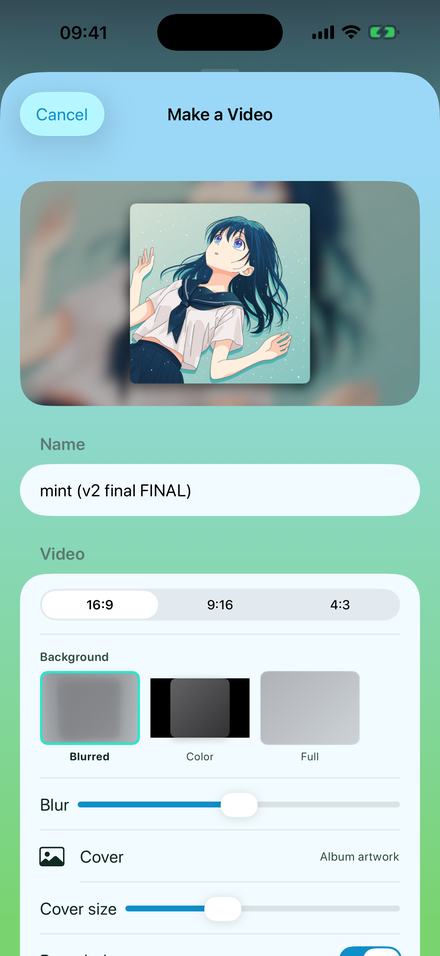
The visual half of the format is almost always the same: a square piece of artwork sitting in the middle of the frame, with a huge, heavily blurred copy of that same artwork filling the space behind it. That is what the Blurred background option does, and the Blur slider is there because the amount matters — too little and the edges of the original picture are still readable behind the cover, too much and the colour goes grey.
The two alternatives are Color, which puts the cover on a flat background you choose, and Full, which bleeds the artwork edge to edge and crops it to the frame. Full is the right answer when the artwork is a photograph rather than a square cover.
How to make one, start to finish
About four minutes on a song you already have, most of it spent deciding how slow is slow enough.
- Add the songTap Add and pick the audio file from Files, or share it into Y2K Player from wherever it lives. A video file works too — the app takes the audio out of it.
- Slow it downOpen the player and drag Tempo. 85% is the sound the scene is named after. With the link on, the pitch drops with the tempo — at 85% that is 2.8 semitones down.
- Set the roomOn the Effects tab, switch Reverb on and pick a space. Hall is the long, washed-out one people mean by "reverb". Mix decides how much of the room you hear.
- Choose the pictureTap Export, then Video. The cover of the song is used by default; tap Cover to swap in your own image, an animated GIF, or a short clip that loops.
- Pick the shape and the background16:9 for a wide player, 9:16 for a vertical feed, 4:3 for the square-ish look. Blurred puts an enlarged, blurred copy of the artwork behind it; Blur and Cover size tune the rest.
- Render itTap the export button and leave the phone alone. The result saves to Photos or Files as an MP4 you can post anywhere.
Everything the export sheet decides
One screen, and every control on it changes the file you end up with. These are the real options, not a summary of them.
The shape is a decision you make before rendering, not a crop afterwards
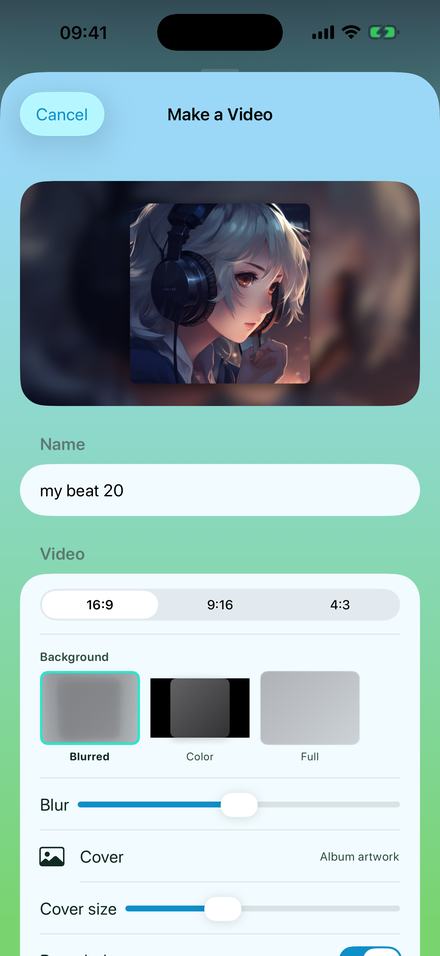
16:9 renders at 1920×1080. 9:16 renders at 1080×1920. 4:3 renders at 1440×1080. The app composes the frame at that size from the start, so the artwork is placed for the shape you picked rather than cut down to fit it.
That matters most at 9:16, where a square cover has a lot of empty space above and below it. The blurred background is doing real work there, and the Cover size slider is how you decide whether the artwork sits small in a field of colour or nearly fills the width.
The file names itself after what you did to the song
The name field arrives filled in with the song title and the speed you set, so a folder of exports stays readable a month later instead of turning into a row of identical titles. You can overwrite it; most people do not.
The cover does not have to be album art. It can be any picture in your library, an animated GIF, or a short video clip that loops underneath the whole song — which is how the looping-clip format is made without an editing app.
Wide for a player, vertical for a feed
The two shapes are not interchangeable and it is worth choosing on purpose.
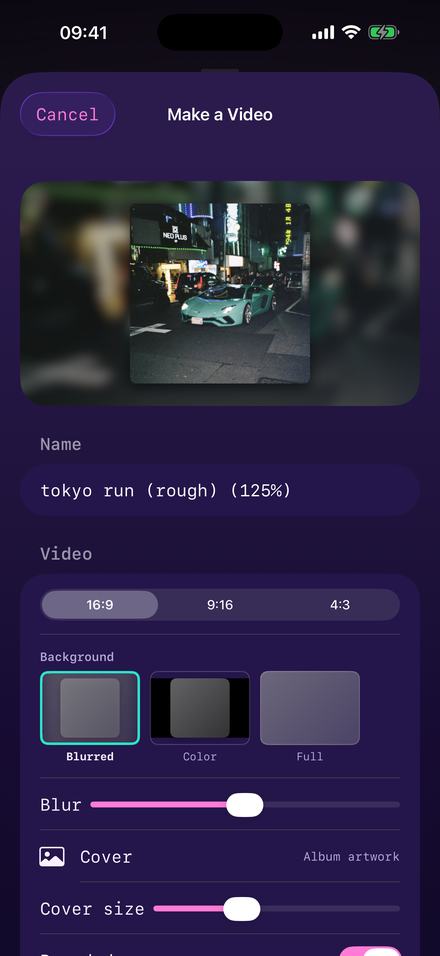
16:9 is the shape of a video player on a laptop or a television. If the video is going somewhere people scrub through a timeline, this is the one. It is also the shape that survives being embedded, and the one that most upload flows treat as the default.
9:16 is the shape of a phone held upright, and of every full-screen vertical feed. A 16:9 video posted into a vertical feed gets letterboxed into a small strip in the middle of the screen, which is why so many reposts of this format look tiny. Render it at 9:16 in the first place and it fills the screen.
4:3 is the odd one and it is there deliberately: it is close to the shape of an old television and of a square-ish upload, and it gives a square cover far less empty space around it than 9:16 does.
There is nothing stopping you rendering the same remix twice in two shapes. The audio is identical; only the frame is composed differently.
The sound underneath it
A video of a badly slowed song is still a badly slowed song. The half of this that people actually hear is the tempo and the room.
There is a preset, and it is called Slowed + Reverb
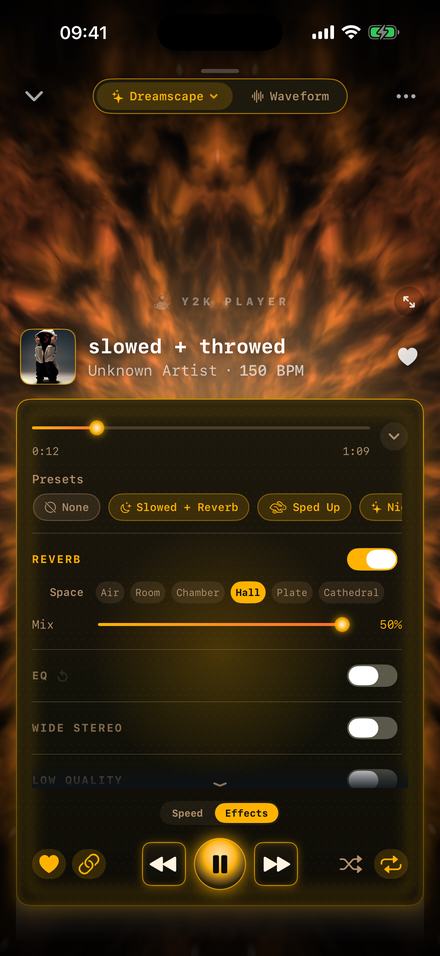
One tap sets the tempo to 0.85×, switches the reverb on and widens the stereo image. It is a starting point rather than a destination — every slider it touched is still a slider, and you hear each change while the song keeps playing.
Six rooms, from a 0.35-second Air to a Cathedral. Hall is the 2.95-second one and it is what most people mean. The Mix slider tops out at 50% on purpose: past that the room stops being an effect and starts being the whole recording.
The full sound is covered on the slowed and reverb page, including which room to reach for and what daycore does differently.
What comes out the other end
| Property | Value |
|---|---|
| Container | MP4 |
| Video | H.264, 30 frames per second |
| Audio | AAC, your remix as you hear it — tempo, pitch and every effect rendered in |
| Sizes | 1920×1080, 1080×1920, or 1440×1080 |
| Length | The whole song, free or Pro |
| Saves to | Photos, or Files, or straight into a share sheet |
| Cover accepts | Album artwork, any photo, an animated GIF, or a video clip that loops from 2 to 30 seconds |
Because the render happens on the device, the length of the song is the only thing that decides how long it takes. Nothing queues, nothing uploads, and the phone can be in airplane mode the entire time.
A sped up video is the same export, pointed the other way
Nothing on this page is specific to slowing a song down. Push the tempo up instead of down and the render is identical — a sped up video comes out of the same sheet, the same shapes and the same length.
125% is where most sped up edits sit; it raises the key by 3.9 semitones, which is the brightness people recognise before they recognise the speed. Set that on the Speed tab, leave the pitch link on, then export to video exactly as described above. If you want it faster and higher still, that is nightcore, and it has its own page. If you want the file rather than the video, the sped up songs page covers the audio side.
One practical note about shape. A sped up edit is usually shorter and busier than a slowed one, so 9:16 tends to suit it — the picture is doing less work per second and a vertical frame keeps the artwork large. A slowed version of the same song reads better at 16:9, where the eye has somewhere to rest.
Turning a song into a music video for a platform that only takes video
This is the other half of why the export exists. Plenty of places will not accept an audio file at all, so a song has to be handed over as a video before it can be posted or shared. That does not require an editor: pick the artwork, pick the shape, render, and what comes out is an ordinary MP4 that behaves like any other music video you would upload. Full length on both tiers, so a six-minute track is a six-minute file rather than a preview of one.
Pulling the audio out of a video you already have
If the only copy of the song is inside a video file, you do not need a second app to get it out. Import the video and Y2K Player takes the audio, adds it to the library as a track, and leaves the video where it was.
From there it is an ordinary song: the tempo and pitch sliders work on it, the waveform screen trims it, and both exports are available. That is the usual route for a recording somebody sent you as a clip, a live take filmed on a phone, or a mix that only ever existed as a screen recording. The extraction is a copy — the source video is never rewritten and never deleted.
The reverse trip is the export on this page: audio in, video out. Together they mean a clip can go in one end and a slowed, re-covered, correctly-shaped video can come out the other without the file leaving the phone at any point.
The parts worth knowing before you download
- Free video export is full length, with a small “Made with Y2K Player” mark that moves between the corners. Pro removes it. The length is not the thing being sold here — the mark is.
- Audio is never watermarked. Not on the free tier, not ever. A tone laid over somebody’s music would make the export worthless, so it does not exist.
- The effect rack is part of Pro. Tempo and pitch are free and always will be; reverb, EQ and the rest are what Pro buys. You can slow a song down and export a video of it without paying anything.
- The video shows your artwork, not a visualizer. The visualizers run full screen while you listen; they are not filmed into the export. If a moving background is what you want, use a GIF or a video clip as the cover.
- Songs downloaded inside a streaming subscription cannot be imported. Those files are locked to their app by design. This works on music you own as a file.
Questions about making the video
Everything below is answered on this page rather than after you install.
Is the free video export really full length?
Yes. A free export runs the whole song, at the same 1080p and the same frame rate as a paid one. The only difference is a small “Made with Y2K Player” mark that fades between the corners. Audio exports are the ones with a length cap — the free tier renders the song’s first 30 seconds as an audio file.
Can I make a sped up video instead of a slowed one?
Yes — it is the same export. Put the tempo above 100% instead of below it, usually around 125%, and render the video the same way. Sped up, slowed and nightcore are all the same two sliders in different places, and the video sheet does not care which one you chose.
Can I turn a song into a music video to upload?
That is what this export is for. Somewhere that only accepts video will take the MP4 this writes: your artwork on screen, your version of the song underneath, full length on the free tier as well as on Pro.
Can I get the audio out of a video I already have?
Yes. Import the video file and the app pulls the audio into your library as a track, leaving the video untouched. After that it behaves like any other song — tempo, pitch, trim and both exports.
Can I post the video anywhere I want?
It is a plain MP4 with H.264 video and AAC audio, which is the format every video site, social app and editing tool accepts. There is nothing app-specific inside it.
How long does rendering take?
It scales with the length of the song and it happens entirely on the device, so an older phone is slower than a new one. A still cover is much faster than an animated one, because a still frame only has to be encoded at the points where something changes.
Can the background move?
Yes, if the cover moves. Pick an animated GIF or a short video clip as the cover and it loops underneath the whole song, with the blurred background built from it. The loop length is adjustable between 2 and 30 seconds.
What resolution and frame rate?
1080p at 30 frames per second in all three shapes: 1920×1080 for 16:9, 1080×1920 for 9:16 and 1440×1080 for 4:3.
Does it need an internet connection?
No. Importing, slowing, adding reverb and rendering the video all happen on the phone. Airplane mode changes nothing except that you cannot buy anything.
Will it change my original file?
No. Speed, pitch and effects are stored as settings attached to the song. The audio file you imported is never rewritten, and turning everything back to normal is one tap on the Original button.
Can I use a photo instead of album art?
Yes — tap Cover and choose any picture from your library. Album artwork is only the default because it is the thing the app already has.
What speed should I use?
Most of this format lives between 80% and 90%. The built-in preset uses 0.85×, which drops the pitch by 2.8 semitones at the same time. Below about 75% the song starts to sound obviously stretched rather than slowed, which is a different aesthetic — that one is usually called daycore.
Can I render the same remix at two different shapes?
Yes. The remix belongs to the song, not to the export, so you can render 16:9, change the aspect, and render 9:16 without touching a slider.
Does it work on iPad?
Yes, on iPhone and iPad, from iOS and iPadOS 18 onwards.
Is Pro a subscription?
No. Pro is a single payment that never renews, and there is no account attached to it. What Pro adds lays out the difference.
Where to go next
- Slowed and reverb, the soundThe preset, the six rooms and what each one does to a song.Open →
- Sped up songsThe other half of the format: 125%, and the file named after it.Open →
- NightcoreSpeed and pitch together, over a full-screen visualizer.Open →
- How to make audios for editsCutting to the hook, and getting a clean file into an editor.Open →
- Best slowed & reverb makerFree · honest comparison · no uploadOpen →
Everything on this page happens on the phone.
Import a song, drag one slider, and render a video of it. No account, no upload, no editing app in the middle.
Free to download and keep. Pro is a one-time purchase — buy it once and it never renews.