
The whole app, no connection · iPhone & iPad
Offline music.
Plays with the wifi off.
Your own files, on your own device, with no account to make and nothing to sign in to. There is no server for anything to go to.
No ads. No subscription. Pro, if you want it, is one payment.
- No accountnothing to sign in to
- No adsnot one, anywhere
- No serversso nothing can be uploaded
What “offline” means here
Not “downloads for offline listening”. There is no online mode to fall back from. The app has no accounts, no analytics, no ads and no servers, so there is nothing for a connection to be for.
That distinction matters because the word gets used for two very different things. Most players described as offline are streaming clients with a cache: you sign in, the catalogue lives somewhere else, and the offline part is a copy that expires if you stop paying or stop checking in. Y2K Player is the older idea. It plays audio files that are on your phone, belonging to you, the same way a music player did before subscriptions existed.
The practical consequences are worth spelling out. There is no login screen, so there is no password to lose. No library is synced, so a second device cannot overwrite what is on this one. There is no catalogue, so nothing you keep can be removed by a licensing dispute. And because your files and settings never leave the device, there is no data to be lost in a breach that could not happen.
Getting your music in
Three routes, and one of them is a whole folder at once.
- Open AddThe fourth tab. It opens a file picker straight into your device and iCloud Drive.
- Pick files, or a whole folderMultiple selection works, and so does picking a folder — the app walks it and imports what it finds, so a downloads folder of a hundred tracks arrives in one go.
- Or share into the appAnything that can be shared as an audio file — an email attachment, a file from another app, something saved from a browser — can be sent straight to Y2K Player from the system share sheet.
- Videos work tooShare or import a video file and the app pulls the audio out of it automatically. What arrives is a track like any other.
- Organise itPlaylists, favourites and search are all local. Recently Played and Most Played build themselves from what you actually listen to.
- Turn the wifi offNothing changes. Playback, speed, pitch, effects, visualizers and exports all run on the device.
A library, not a folder
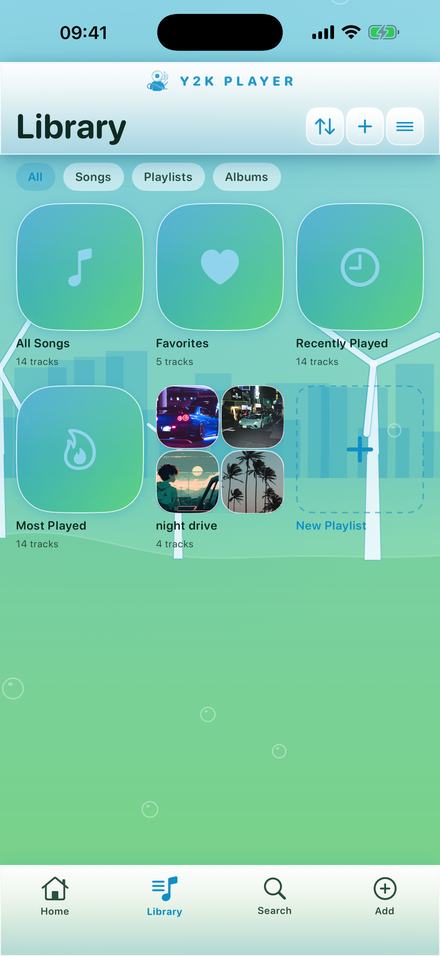
Imported files stop being files. They get artwork, a detected tempo, playlists, favourites and a history — all of it built on the device.
Everything on this screen is local
All Songs, Favorites, Recently Played, Most Played and any playlist you build are computed on the device from what is actually there. Nothing is fetched and nothing reports back.
Search works across the library with suggestions rather than a blank box, and there is a queue, a sleep timer, shuffle, repeat and per-song notes for lyrics or ideas.
The app also reads the tempo of each track and prints the BPM under the title — which is what lets the beat-locked effects land on the grid instead of guessing.
The heavy parts run on the phone too
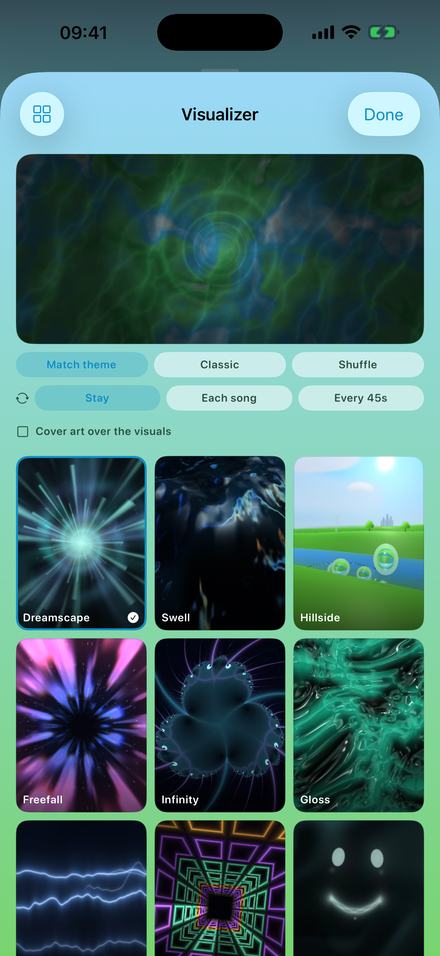
The visualizers are rendered live on the device’s own graphics hardware from the audio that is playing. Nothing is streamed, downloaded per scene, or fetched from anywhere.
The same is true of exports. Rendering a full-length video happens locally, which is why it takes as long as it takes and why it works in airplane mode.
The full set is on the visualizers page, and the themes that restyle the rest of the app are on the themes page.
What still works in airplane mode
All of it, with exactly one exception.
- Playing anything in the library, with speed, pitch and the whole effect rack
- Importing files from your device
- Building playlists, favourites, loops and trims
- Every visualizer and every theme you already have
- Exporting audio as M4A or WAV
- Rendering a full-length video
The exception is buying something, because purchases go through the App Store and the App Store needs a connection. Once a purchase is made it is yours offline, and restoring it later is the only other moment the app has any reason to be online.
No ads, in any form
Not banners, not interstitials, not a sponsored row in the library, not a rewarded video in exchange for an export. The business model is that some people buy Pro; there is no second model underneath it.
Nothing is collected, because there is nowhere to send it
No analytics SDK, no crash reporter phoning home, no advertising identifier, no device fingerprint, no account. Your files and your playlists live in the app’s own storage on your phone, and the copy inside the app is deleted with it. A few small things ride your own iCloud so a new phone feels familiar — your favourites, your listening counters and streak, and which theme and visualizer you picked. That is your iCloud account, not a server of mine, and no audio is ever mirrored.
This is not a promise made to be pleasant. It is the shape of the product: an app with no servers has nothing to collect data into. The full statement is on the privacy page, and it is short because there is very little to say.
Where the files come from
“Music you own” is a larger category than it sounds, and it is worth listing because the answer is usually “more than you thought”.
- Music you bought as files. Anything purchased from a download store is a file you keep, and it imports directly.
- Your own recordings. Voice memos, rehearsal tapes, demos, mixes bounced out of a DAW, a phone recording of a gig.
- Anything sent to you. A producer’s beat, a stem from a collaborator, a mix a friend attached to a message — all of it can be shared straight into the app.
- Audio inside a video. Import the video and the app extracts the sound. This is the route most people forget, and it covers a great deal.
- Whole folders. If a library already exists on the device or in iCloud Drive, the importer takes a folder in one action rather than a file at a time.
What does not work, and why
Downloads made inside a streaming subscription are protected files that only their own app can decode. That is deliberate on the part of the services and there is no way around it in a third-party player — not here, not anywhere. If a track exists only inside a subscription, nothing outside that subscription can slow it, speed it up or export it.
Space
Imported audio is copied into the app’s own storage, which means the library takes up real room on the device — roughly whatever the files themselves weigh. That is the price of not depending on anything outside the phone. Deleting a track inside the app removes its copy; deleting the app removes all of them, and neither touches whatever you imported from.
What it is not
- It is not a streaming service. There is no catalogue and no search for music you do not already have. You bring the files.
- Music inside a streaming subscription cannot be imported. Those downloads are protected and locked to their own app by design. Purchases, downloads, rips of your own recordings and files people send you all work.
- Your audio files do not sync. Two devices hold two libraries, because there is no account to sync a library through. Your favourites, counters and chosen look ride your own iCloud so a new phone starts where the old one stopped.
- Free audio export writes the first 30 seconds. Video export is full length on both tiers, with a small corner mark on the free one.
- A set of themes and visualizers is free, with a three-day window to try the others. The effect rack is part of Pro and is not in that window. Pro opens the rest, once, for one payment.
Questions about running without a connection
The ones that matter before you commit a library to something.
Does it work with no internet at all?
Yes. There is no account, no sync and no server. Playback, editing, visualizers and exports all run on the device. The only thing that needs a connection is buying or restoring a purchase, which goes through the App Store.
Do I have to make an account?
No. There is no sign-in screen anywhere in the app.
Are there ads?
None. No banners, no interstitials, no rewarded videos, and no sponsored content in the library.
Is it a subscription?
No. The player is free. Pro is a single payment that never renews.
What audio formats can I import?
The standard formats an iPhone can decode, which covers almost anything you are likely to have. Video files work too — the app extracts the audio from them.
Can I import songs from a streaming subscription?
No. Downloads inside a streaming app are protected and cannot leave it. This plays files you own outright.
Can I import a whole folder at once?
Yes. Pick a folder in the importer and the app walks it and brings in what it finds.
Does it collect any data about me?
No analytics, no tracking, no identifiers, no crash telemetry. Your files and settings never leave the device. The privacy page says the same thing at length.
Where does my music go if I delete the app?
The copy inside the app is deleted with it, along with its settings. Whatever you imported from is untouched, because the app only ever read it.
Does it sync between my iPhone and iPad?
Your audio files do not — each device holds its own library, and there is no account to sync through. A few small things ride your own iCloud so a new phone feels familiar: your favourites, your listening counters and streak, and which theme and visualizer you picked.
Can I still change speed and add effects offline?
Yes, all of it. The audio engine is local, so tempo, pitch and the effect rack behave identically with the wifi off.
Can I export a video offline?
Yes. Rendering happens on the phone, which is exactly why it works with no connection.
Where to go next
- Slowed and reverbThe sound, the six rooms, and where the pitch lands.Open →
- Slow a song down for practiceLoop a bar and play it in a room with no signal.Open →
- VisualizersRendered on the device, from the song that is playing.Open →
- PrivacyThe short version: nothing is collected, ever.Open →
- Music Player and Audio Editor for iPad &iPad layout · landscape & full screenOpen →
- Music Player for iPhoneLocal library · iPhone & iPadOpen →
Bring your own music. Keep it.
Free to download, free to keep, and it never asks who you are.
Free to download and keep. Pro is a one-time purchase — buy it once and it never renews.