
Chop & screw · iPhone & iPad
Screwed to 0.72×.
Chopped on the beat.
The Houston method on the files already on your phone: the tempo down, the key down with it, and the record tripping over itself every couple of bars.
Free to use. Pro is one payment — forever.
- where the key lands
- 1/16the slice it repeats
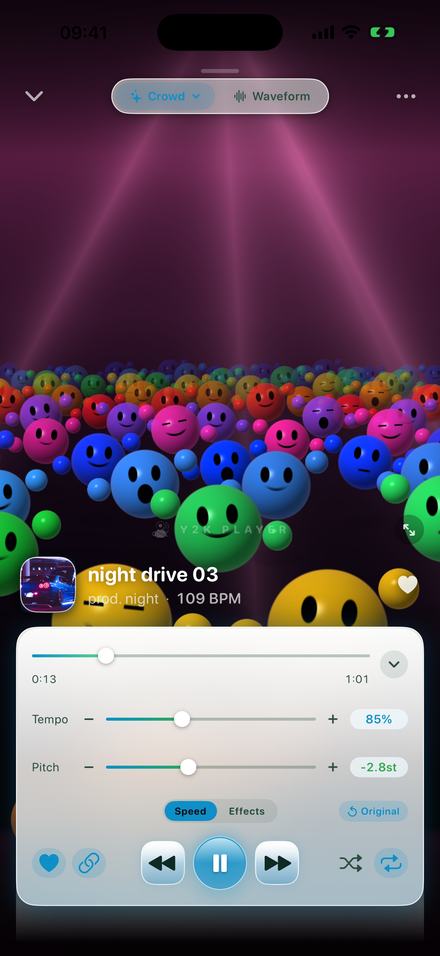
Two halves, and most tools only do the first one
Screwed is the speed. Chopped is the record doubling back on itself. A track with only the first half is a slow song, which is a different thing.
The technique came out of Houston at the start of the nineties, made on two turntables with two copies of the same record. Screwing it was the pitch fader held down until the record ran well under the speed it was cut at: everything longer, darker, heavier, the voice several semitones below the note anybody actually sang. Chopping it was the second copy — a beat caught, dragged back and played again, so a line stutters, doubles, and lands back on the beat.
Software got good at the first half long ago; any speed control hands you a slow song. The second half is the hard one, because a repeat that arrives at the wrong moment does not sound like a DJ, it sounds like a dropout. The tool has to know where the beat is before it can interrupt one.
The screw: 0.72×, and the key 5.7 semitones down
That is where the built-in Chopped preset leaves the tempo, and where the key ends up once the link has followed it.
On a turntable, speed and pitch are one knob: slowing a record moves its key by twelve semitones for every halving of speed, and that drop is most of what people hear when they call something screwed. Tempo and pitch are linked here by default, so dragging the speed down drags the key with it. Switch the link off and the song slows in its original key — useful for practising, and not this sound.
0.72× is a long way past the 0.85× that slowed and reverb sits at: slow enough that a hi-hat stops being a tick and becomes a sound with a length to it. It holds together that far down for one reason: with the link on, the change is a resample — the same operation the turntable was performing — rather than a time-stretcher asked to move the pitch and stretch the time at once. Nothing is rebuilt out of grains, so the low end keeps its weight.
The chop: it has to find the beat first
Every repeat is placed against a grid the app worked out from the song itself. That is why the Chop group in the rack carries a small BPM badge.
Tempo is estimated once, offline, when a song is imported: seventy seconds read from inside the file, an onset envelope built from it, an autocorrelation run between 55 and 200 BPM. On a long track two separate windows have to agree within 5% or the answer is thrown away, and when nothing settles on a pulse it returns no number at all. Whatever it finds is printed under the artist name.
The chop locks to the tempo you are hearing, not the one on the label. Screw a 109 BPM track to 0.72× and the beat runs at about 78, so that is the grid. It also knows where beat one falls rather than only how long a beat lasts, so the pattern sits on the bar instead of at some offset inside it — most of the difference between an effect that sounds played and one that sounds switched on.
A chop is a read position, not a buffer trick
Underneath, the effect holds a rolling recording of the last few seconds — about twelve at CD rate, enough for a whole bar of a record this slow — and every chop is one decision: how far behind the live audio to read from. Hold that gap still and you get the classic doubling. Let it open at two samples per sample and the read head moves against the write head, so the music comes out backwards. Let it accelerate and you get a tape coming to a stop.
How to do it
Two minutes, most of it spent deciding how far down is far enough.
- Add a song you ownTap Add and pick an audio file from Files, or share one into Y2K Player. It has to be a file on the device — downloads inside a streaming subscription are locked to that service’s own app.
- Let it find the tempoGive the app a moment after the import. It estimates the song’s BPM offline and prints it under the artist name, and the chop needs that figure to know where the beat is.
- Tap ChoppedThe preset row sits at the top of the Effects tab. One tap takes the tempo to 0.72×, keeps the pitch linked so the key falls with it, switches the chop on in Cycle and clears the rest of the rack.
- Set the depth by ear0.72× is the reference point, not a rule. Drag the tempo around it while the song plays — a record that was already slow needs less, a busy one takes more.
- Decide how often it tripsChance is how many of the scheduled events actually fire; the preset sits at 45%. Lower it if the chop is answering every bar, raise it if the song goes too long between them.
- Keep it, or export itThe setting belongs to that song and it is still there next time you open it. Export renders the tempo, the chop and the EQ into an M4A, a WAV or a full-length MP4.
What one tap on Chopped actually sets
- Tempo 0.72×, pitch link on, so the key falls 5.7 semitones.
- Chop on, Style set to Cycle — a different kind of chop each time it fires.
- Size 1/16, four repeats. Short bites, played in a run.
- Scheduled every 8 beats — two bars in common time, not once a bar.
- Chance 45% and Variation 25%, so fewer than half of those events fire, the grid drifts a little, and long clean stretches sit between them.
- Reverb at 22 of the 50 the mix control allows — a room, not a wash.
- EQ tilted downward: a +5 dB shelf at 80 Hz, +2 at 250, flat at 1 kHz, −1 at 3.5 kHz, a −2 dB shelf at 10 kHz.
- Everything else cleared, so yesterday’s distortion is not riding along under today’s screw.
Six things a chop can be
Style is a row of chips rather than a slider, because these are six different things and not six amounts of one thing.
- Stutter repeats the slice where it was captured — the classic doubling, and the spine of the sound.
- Rewind runs the fragment backwards at normal speed.
- Stop is the tape dying, and it ends in silence rather than on a held sample.
- Half drops the passage to half speed for the length of the event.
- Hold freezes a fragment long enough to still be music rather than a buzz.
- Cycle chooses one of the others every time.
Cycle is what the preset uses, and it is weighted rather than even: roughly fifty-six times in a hundred it takes the plain stutter, twenty-two half time, eighteen a rewind, four the tape stop. A rewind every other bar stops being a surprise, and the surprise is the whole value of a rewind.
Size is the note value that gets repeated: a half, a quarter, an eighth or a sixteenth. Nothing smaller is offered, because at a screwed tempo a sixty-fourth is about twelve milliseconds — shorter than the drum hit it is meant to repeat, so it buzzes rather than chops. Advanced holds the rest: how many beats apart events are scheduled, how many repeats each plays, and how far the pattern may wander.
Said plainly
- The screw is free, the chop is not. Tempo and pitch work on every song you own; the chop lives in the effect rack, which is part of Pro. Free to use. Pro is one payment — forever.
- It plays files you already own. Music inside a streaming subscription is locked to that service’s own app and cannot be opened here.
- The settings belong to the song. A screwed track opens screwed next week; the Original button puts it back in a tap.
- The export is the same engine. Free audio export writes the first 30 seconds, Pro writes the whole song, and video export is full length either way.
- A wrong BPM makes a wrong chop. Correct the number by hand and the grid moves with it.
- It works in airplane mode. No account, no upload, no server.
Questions about chopping and screwing
Worth answering before you install anything.
What tempo is chopped and screwed?
The built-in preset uses 0.72×, which with the pitch link on puts the key 5.7 semitones down. Most of this sound lives between roughly 0.65× and 0.80×. Higher than that and you are into slowed and reverb, which is a gentler, different thing.
How slow can it actually go?
The tempo slider covers 50% to 150% with 100% dead centre. The small buttons either side step in 5% and reach 25% at the bottom and 200% at the top, so anything from a quarter speed to double is available.
Does the chop need to know the song’s BPM?
Yes, and that is why the Chop group carries a BPM badge. The grid comes from the tempo the app detected, adjusted for the speed you are playing at. If no tempo was found, or the one found is wrong, the repeats have nothing sensible to land on — the number can be corrected by hand.
Can I chop a song without slowing it down?
Yes. The chop is a separate switch from the tempo slider. Leave the speed at 100%, turn Chop on, and you get beat-locked stutters at the song’s own tempo. The two halves are only joined together in the preset.
Is the chop free?
The tempo and pitch sliders are free on every song you own, so the screwed half costs nothing. The chop is part of the effect rack, which is Pro. Free to use. Pro is one payment — forever.
Will the exported file sound like what I heard?
Yes. The export runs the same chop through the same settings offline, and the grid is re-anchored to wherever the export starts, so a trimmed export chops in the same places the audition did.
Can I do this to a song from my streaming subscription?
No. Downloads inside a streaming service are locked to that service’s own app and cannot be opened by anything else. This works on audio files you own — bought, exported, or your own recordings.
Where to go next
- Try it in your browserFree in your browser — the slowed half of the recipe, liveOpen →
- Slowed and reverbThe gentler end of the same slider, with a room around it.Open →
- Slow a song downSlower with the key left alone — for practising, not for posting.Open →
- Change the keyMoving the pitch on its own, in semitones, either direction.Open →
- What Pro addsThe effect rack the chop lives in, and everything else behind it.Open →
Screw one song and hear where it lands.
Open a track you already own, drag the tempo down to 72%, and listen to the key fall with it while it plays. Free to use. Pro is one payment — forever.
Free to download and keep. Pro is a one-time purchase — buy it once and it never renews.