
Tone control · iPhone & iPad
An equalizer
that stays with the song.
Five faders from 80 Hz to 10 kHz, moved while the music plays, and remembered for that one track rather than for everything you own.
Free to use. Pro is one payment — forever.
- 5 faders80 Hz to 10 kHz
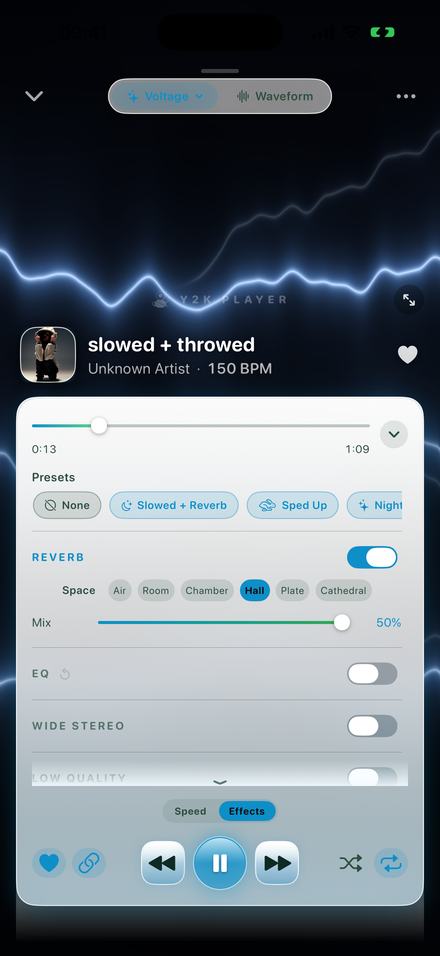
An EQ that belongs to one song, not to the phone
Five faders inside the player, moving the audio as it plays, and staying with the track you set them on.
An equalizer is a row of volume controls, each one covering a slice of the frequency range rather than the whole of it. Raise one and the part of the song living in that slice gets louder relative to everything around it.
What is unusual here is the scope. A tone control is normally one setting for everything you listen to — dialled in for one record, then still there, quietly wrong, when the next one starts. In Y2K Player the curve is part of a song’s own settings, next to its tempo and its pitch. A phone recording of a gig with no top end and a modern master with too much of it can sit in the same library with opposite curves.
The boundary is the other half of that. The EQ shapes what this app is playing and nothing else on the device, and what this app plays is audio you already have — files from your storage, or the sound taken out of a video you imported. It cannot reach a streaming service.
Five faders, and the quickest way to know which one to move
80 Hz, 250 Hz, 1 kHz, 3.5 kHz and 10 kHz, each running from −12 to +12 dB in whole-decibel steps.
The bank is short on purpose: five controls you can reason about beat thirty you have to hunt through. The outer two are shelves, lifting or dropping everything past their corner frequency; the inner three are bells roughly 1.3 octaves wide, broad enough to change a tone and too broad to do surgery with. Rather than memorising the frequencies, work backwards from whatever is bothering you.
- Nothing underneath it. 80 Hz, up. The shelf brings the whole bottom of the record with it instead of picking out one note.
- Boxy, like it is playing inside a cupboard. 250 Hz, down. This band needs cutting far more often than boosting.
- The voice is stuck behind the instruments. 1 kHz. A small lift brings a vocal forward; a cut pushes the whole mix backwards.
- The words are hard to make out. 3.5 kHz, up a little. The same fader downwards fixes a recording that is tiring after ten minutes.
- Dull, like a blanket over the speaker. 10 kHz. The top shelf opens it out; on an already bright master, pulling it down is the more useful direction.
One habit worth borrowing from people who do this for a living: cut before you boost. When something sounds wrong, the band responsible is usually too loud rather than the rest being too quiet, and taking something away leaves you headroom instead of spending it.
Where the EQ sits, and why the order matters
The song passes the speed and pitch stage first, reaches the EQ next, and only then reaches the reverb.
Because the EQ comes after the tempo and pitch stage, it shapes the version you are actually listening to. With the pitch linked to the tempo — the default, and the way a record behaves — slowing a song moves every frequency in it downwards. A bassline sitting comfortably above the bottom shelf at full speed can be sitting inside it at 85%. The faders describe what is leaving the speaker, not what is in the file.
Because the EQ comes before the reverb, the room hears the shaped signal rather than the raw one. Lift the top and the tail brightens with it. Cut 250 Hz and the reverb stops booming along with the song — on a slowed and reverb mix turning muddy, that cut is usually a better move than pulling the reverb Mix down.
Why a boost also turns something down
Every decibel of boost is paid for. The largest boost in your curve pulls the EQ’s output back by 0.7 dB for each decibel it adds, so the Bass curve’s +6 dB arrives with 4.2 dB of trim behind it.
That is deliberate. A boost with nothing pulled back drives the signal past full scale, the converter clips it, and that crackle on loud material is most of what makes a phone equalizer sound cheap. The trim is partial rather than exact, so a boost still feels like a boost while staying clean.
Where to start
A minute, on a song that is already playing.
- Start the trackThe faders act on the audio leaving the speaker at that moment, so keep the song running while you work and judge it by ear rather than by the shape of the curve.
- Open the rackTap Effects, beside Speed, under the transport buttons. EQ is the second group down. In landscape and on iPad there is an Equalizer tile that opens the rack at that group directly.
- Switch it on, then off againThe group toggle leaves every fader where it is while the group is off, so two taps is an honest comparison between your curve and the song as recorded.
- Try a chip, or go straight to the fadersThe five preset chips write a whole curve at once. They are numbers rather than modes — move any fader afterwards and the curve is yours.
- Adjust one band at a timeDrag a fader and the label beneath it swaps from the frequency to the gain you have reached, in whole decibels between −12 and +12. Double-tap a fader to return it to zero.
- Walk awayThere is no save button. The curve belongs to that song from then on, and anything you export later is rendered with it.
The five chips, and the numbers they write
- Flat — 0, 0, 0, 0, 0. The way back, and the honest comparison against whatever you just dialled in.
- Bass — +6, +4, 0, 0, +1. Weight low down, warmth above it, the middle left alone so nothing gets buried.
- V-Shape — +5, +2, −2, +2, +5. Scooped: loud through a phone speaker, wearing on headphones.
- Vocal — −2, 0, +3, +4, 0. Brings a singer out of a crowded or muddy recording.
- Air — 0, −1, 0, +2, +6. Opens the top end without adding anything at the bottom.
A chip stays lit only while the five faders match it exactly, so the moment you move one by hand the panel stops claiming you are on a preset. That is the intended use: a starting position, not a mode. The reset beside the group header flattens all five at once, and greys itself out when there is nothing to flatten.
Some of the whole-song presets write into these bands too. Sped Up sets −1, 0, 0, +2, +3 so the low end does not thicken as the track brightens; Nightcore pushes further with −2, −1, 0, +2, +4; Chopped carries +5, +2, 0, −1, −2 underneath it. Tap one, then open the EQ group: the faders will have moved, and they are yours from there.
What happens to the curve afterwards
Nothing to save, nothing to re-apply, and nothing done to the original file.
The curve is stored in that song’s settings, alongside its tempo, pitch, trim and any loops, and comes back the next time the track loads. Your file is untouched: an import is copied into the app’s own storage and from then on only read from.
Exports run through the same chain you were listening to, with the same five frequencies and the same headroom trim, so an M4A, a WAV or the audio inside a video export sounds like the thing you auditioned. A free export writes the song’s first 30 seconds; Pro writes the whole track.
What it will not do
- Invent what was never recorded. If nothing lives below 60 Hz in the file, raising the bottom shelf makes the little that is there louder and stops.
- Make the song louder. Boosting spends headroom, so a heavily boosted curve can end up quieter than flat.
- Stand in for a mixing desk. Fixed frequencies, one bandwidth, whole-decibel steps — shaping a listen, not repairing a mix.
- Beat the hardware. A large lift at 80 Hz on earbuds that cannot move that much air gives strain rather than weight.
- Come free. Speed, pitch, trimming and looping cost nothing. The effect rack, EQ included, is what Pro unlocks.
What people ask about the EQ
The ones that come up while a fader is under your thumb.
Does Y2K Player have an equalizer?
Yes — five bands at 80 Hz, 250 Hz, 1 kHz, 3.5 kHz and 10 kHz, each running from −12 to +12 dB. It is a group in the effect rack, one below Reverb, and it works while the song is playing.
Can I set a different curve for every song?
That is the default behaviour. The curve is written into that track’s own settings, so there is no library-wide equalizer to remember to switch off before the next song starts.
Can I use it on music from a streaming service?
No. Y2K Player plays audio files you already own and cannot import from a streaming service, and its EQ only touches what the app itself is playing.
What do the numbers under the faders mean?
At rest each fader shows the frequency it controls. While you are moving one, the label becomes the gain you have landed on, in whole decibels. Double-tapping a fader sends it back to zero.
Why does the song get quieter when I boost a band?
Headroom, on purpose. The largest boost in the curve pulls the EQ’s output back by 0.7 dB for every decibel it adds, so a +6 dB boost comes with 4.2 dB of trim. Without it, big boosts clip and the result crackles.
Does the EQ still work on a slowed or sped up version?
Yes. It sits after the tempo and pitch stage and before the reverb, so it is shaping the version you are hearing rather than the original file.
Is the curve baked into an exported file?
Yes. Exports are rendered through the same chain as playback, so an M4A, a WAV and the audio inside a video export all carry it. A free export covers the song’s first 30 seconds; Pro writes the whole track.
Where to go next
- Bass boostThe bottom shelf on its own, and why it is a shelf rather than a bell.Open →
- Slowed and reverbThe group the EQ feeds into, and the six rooms it offers.Open →
- Sped up songsThe speed stage the EQ sits downstream of, and where the key lands.Open →
- Pro — one paymentWhat the effect rack costs, once, and what stays free.Open →
Five faders, and the song remembers them.
The EQ is part of the effect rack, which is what Pro unlocks. Free to use. Pro is one payment — forever.
Free to download and keep. Pro is a one-time purchase — buy it once and it never renews.