
Lo-Fi preset · iPhone & iPad
Make a lo-fi version
of a song you own.
One chip on the Effects tab sets the speed, files the top off the sound and puts a small room behind it, on a track that is already playing.
Free to use. Pro is one payment — forever.
- where the key lands
- Age 42on the Low Quality dial
What the Lo-Fi preset writes into a song
One chip in the Presets row, four decisions, and everything else cleared out of the way.
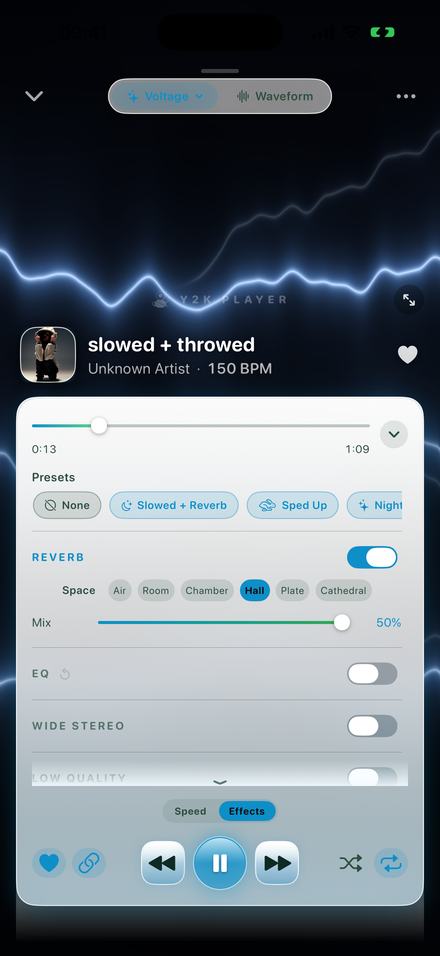
Lo-Fi sits in the Presets row at the top of the Effects tab, between Rewound and Dreamy. Tapping it sets the tempo to 0.92× with the speed and pitch link on, switches Low Quality on with its Age dial at 42, switches Reverb on with Mix at 18% in the Room space, and switches every other effect off.
That last part is the half nobody thinks about. A preset that only adds things stacks onto whatever you were doing an hour ago, so a bitcrusher you had forgotten about rides along underneath. Every preset here wipes the rack back to its defaults first and then writes its own handful of values, which is why Lo-Fi sounds the same on the fortieth song as it did on the first.
With the link on, the key follows the speed the way a record does — twelve semitones per doubling. At 0.92× that lands 1.4 semitones down. It is not a transposition anybody would name, and it is exactly enough that a vocal sits lower and stops pushing. Switch the link off and the song gets slower in its original key, which is a different sound and usually not this one.
What “Low Quality” is actually doing
Three things at once, all of them moving under a single dial called Age.
The first and largest is a bandwidth ceiling: a second-order lowpass that sits wide open at 15 kHz with the dial at zero and closes steeply as you raise it. At Age 42 it has come down to somewhere around 5.5 kHz. Everything above that is simply gone, which is why cymbals turn into a soft hiss and a sung consonant loses its edge. This is most of what people mean when they say a track sounds like it came off a burned disc.
The second is a swirl. Two allpass filters in series, their coefficient riding an oscillator running under one hertz at this setting, offset slightly between the left and right channels. Nothing is filtered out; the phase moves. That is the watery, faintly seasick smear a low-bitrate encoder leaves behind, and it is the part that makes a result sound aged rather than merely muffled.
The third is grit — a sample-and-hold decimator — and it does not begin at all until the dial passes 30. At 42 there is a little of it and no more. That is why 42 was picked instead of the knob’s own default of 50: it is the place where the ceiling does nearly all the work and the destruction has only just started. Age 100 is not more lo-fi. It is a broken file.
The Mix beneath it arrives at 100%, meaning full takeover: you hear the processed signal and nothing else. Pull it down and the untouched song fades back in underneath, which is a good way to keep a bass line intact while the top of the track falls apart.
How to make one
A couple of minutes, and most of that is deciding how tired you want the file to sound.
- Add the songTap Add and pick the file, or share it into Y2K Player from wherever it lives. A video file works too — the audio is pulled out of it and behaves like any other track.
- Tap Lo-FiOpen the Effects tab and find Lo-Fi in the Presets row. One tap sets the tempo to 0.92×, switches Low Quality on with its Age dial at 42, switches Reverb on at 18% in the Room space, and clears every other effect.
- Decide how worn it should beDrag Age. Under 30 it is only the filter and the swirl; over 30 the sample-and-hold grit joins in. The Mix underneath decides how much of the untouched song is left below it.
- Set the roomReverb arrives on Room, the plainest of the six spaces. Air is drier and smaller, Hall is longer. The Mix slider stops at 50%, because a room past that swallows the song.
- Put the weight backThe ceiling has taken the top off the track, so the bottom has to hold it up. On the EQ, the Bass curve lifts 80 Hz by 6 dB and 250 Hz by 4 in one tap.
- Keep it, or export itThe settings stay with that song on their own. Export renders an M4A or a WAV with the speed, the key and the whole rack baked in, named after the track.
Where to go once the preset has landed
It is a starting position, not an answer. These are the controls worth moving next.
The tempo. 0.92× is a nudge rather than a slow, and that is deliberate: lo-fi is a texture laid over a song that still walks at roughly its own pace. Every track shows its detected tempo beside the artist name, so the arithmetic sits in front of you — a 90 BPM song lands at 83, a 140 BPM one at 129. Take it down to 0.85× and you have crossed into slowed and reverb, which is a different scene with its own page.
Age. Below 30 you get the ceiling and the swirl with no decimation at all, which is the cleanest form of this sound and the one that survives being played loud. Between 30 and 60 is where the preset lives. Past 70 the sample-and-hold takes over and the result stops being something you would play twice.
The room. Room is the plainest of the six spaces and the preset uses it at 18% — present, not the point. Air is smaller and drier. Chamber and Hall are longer, and Hall at a higher Mix is the road from here to something dreamier. The slider stops at 50% because a room past that washes the song away.
The EQ. Five bands at 80 Hz, 250 Hz, 1 kHz, 3.5 kHz and 10 kHz, each moving twelve decibels in either direction, with one-tap curves above them. The Bass curve lifts 80 Hz by 6 dB and 250 Hz by 4, and it is the right pairing here: the ceiling has taken the top off the track, so putting weight back at the bottom is what keeps the result warm instead of thin.
The Bitcrusher, if you want the harsher relative. It quantises the signal from sixteen bits down to as few as three and can hold each sample for up to forty frames — damage that is digital and obviously deliberate, where Low Quality is worn and accidental. They will stack, and mostly they should not.
When a combination finally sounds right, the Save chip at the end of the Presets row keeps it: the speed, the pitch and every effect exactly as they are, under whatever name you type. It joins the row beside the built-in ones and applies to any other song in one tap.
Worth knowing before you install anything
- The Effects tab is part of Pro, and the Lo-Fi chip lives on it. The Speed tab is not: the 0.92× on its own is there for everybody, and it is a real half of this sound.
- Nothing is destructive. The file you import is copied into the app once and then only read. The tempo and the rack are numbers stored beside it, and the Original button puts a song back the way it was recorded.
- Every song keeps its own settings, so a track you made lo-fi opens lo-fi next time while the rest of the library stays untouched.
- Export writes M4A or WAV with the speed, the key and the whole rack rendered into the file. Free export covers the song’s first 30 seconds; Pro removes the cap.
- It plays files you already own — from Files, from the share sheet, from a video you pull the audio out of, or from the Music app when the item is a real file sitting on the device. Downloads that belong to a streaming subscription are protected and cannot be read by any third-party app.
- No account, no server. Airplane mode changes nothing.
One chip, and the file already sounds tired.
Questions about making a lo-fi version
The ones worth answering before anything gets installed.
What does “lo-fi” mean when you are making one?
A song played back as though it had been through something worn: the top end filtered away, the phase smeared the way a low-bitrate encoder smears it, and usually a little slower than it was recorded. The Lo-Fi preset does those three things and stops there.
What exactly does the Lo-Fi preset set?
Tempo 0.92× with the speed and pitch link on, Low Quality switched on with Age at 42, Reverb switched on at 18% Mix in the Room space, and every other effect switched off. Those are the values in the app, not a description of them.
Why 0.92× and not something slower?
Because lo-fi is a texture rather than a tempo. The song is meant to still move at roughly its own pace while the file around it falls apart. At 0.85× you are making slowed and reverb instead, which is a different thing people are asking for.
Can I make it sound more worn than the preset?
Yes. Raise the Age dial: past 30 a sample-and-hold decimator joins the filter and the swirl, and it gets rougher quickly from there. The Bitcrusher is the harsher alternative — sixteen bits down to three, and sample-holding up to forty frames deep.
Do I need Pro for the Lo-Fi preset?
The preset sits on the Effects tab, which is part of Pro. The tempo change is not gated, so the 0.92× is available to anyone. Free to use. Pro is one payment — forever.
Can I export the lo-fi version as a file?
Yes. Export renders an M4A or a WAV through the same engine you were listening to, so the speed, the key and every effect are baked in rather than stored as instructions. Free export covers the first 30 seconds; video export is full length on both tiers and carries a small corner mark until Pro removes it.
Does any of this change my original file?
No. The audio you add is copied into the app’s own storage and then only ever read. Everything you hear is a set of numbers stored beside it, and one tap on Original clears them.
Where to go next
- Slowed and reverbThe neighbouring sound: 0.85× with a real room around it.Open →
- Bass boostThe 80 Hz shelf that keeps a filtered track from sounding thin.Open →
- Turn it into a videoCover art, a blurred background, and a full-length MP4.Open →
- Works offlineNo account, no upload, nothing to sign in to.Open →
Try it on something you already have.
Free to use. Pro is one payment — forever.
Free to download and keep. Pro is a one-time purchase — buy it once and it never renews.