
Streaming and ownership · iPhone & iPad
Can you slow down or add reverb
to a song from a streaming app?
No — a protected download cannot leave the app that made it, on any phone, in any player. Here is what does work instead, and how the same sound is made from a file you own.
Free to use. Pro is one payment — forever.
- Nonot from a protected download
- where the slowed sound sits
No — and it is worth a minute to know why
The short version, before anything else on this page: a song that lives inside a streaming subscription cannot be slowed down, pitched or given reverb by any other app.
That is not a gap in one player. A track downloaded for offline listening inside a subscription is a protected file: encrypted, tied to that account on that device, and only ever decoded inside the app that made it. Nothing else on the phone is given the key — not this app, not any app, not a setting you have failed to find. Protected downloads cannot leave the app that made them, and that is a platform rule rather than a limitation any player chose.
If that was the whole question, you have the answer. The rest of this page is what people want next: the same sound, made from a file you own — and most people own more of them than they think.
What a downloaded subscription track actually is
It looks like a file on the screen. Underneath it is closer to a ticket.
An offline download is not a copy of the song handed over to you. It is encrypted audio plus a licence recording which account may play it, on which device, and for how long, and the app decodes it inside a protected path that never exposes plain audio to anything outside itself. Copy the file off the device and it is noise. Let the subscription lapse and it stops playing — not because the bytes changed, but because the licence did.
iOS draws the same line at system level: when an app asks for songs from your music library, protected items are flagged and cannot be exported. Y2K Player's importer reads that flag, skips those items and tells you how many, rather than failing quietly.
None of that is a scandal. It is the trade that lets a monthly fee cover a catalogue: you are renting access, not buying files. The edit you have in mind needs a file.
The music you can already do this to
Before buying anything, check what is already on the phone. This list catches most people.
- Music you bought as a download. Anything from a store that sells files rather than access is a file you keep.
- Your own recordings. Voice memos, a rehearsal tape, a bounce out of a DAW, a phone recording of a set.
- Anything sent to you. A producer's beat, a stem from a collaborator, a mix attached to a message — share it into the app from wherever it arrived.
- The audio inside a video. Import the clip and the app pulls the sound out as a track, leaving the video where it was. This is the route people forget.
- Music synced from a computer. Ordinary files sitting in your music library. The importer takes the ones that are not protected.
- A whole folder. Point the importer at a directory and it walks it, sub-folders included, in one action.
MP3, M4A, WAV, FLAC and ALAC all open; the folder importer also takes AAC, AIFF, CAF, and MP4 and MOV for the audio inside them. Everything is copied into the app's own storage, so the original stays where you left it.
If it is one song, buy the one song
The usual version of this question is about a single track: one hook to slow down for an edit, one song to fall asleep to at 85%. A subscription is the wrong instrument for that. Buying the track as a download is a one-off cost, and afterwards the file is yours — it opens in this app, in an editor, on a laptop, in ten years. Check that what you are buying is a file and not a licence to stream it, because some stores sell both and the buttons look alike.
Buying straight from an artist is often the best-sounding route, because direct downloads are frequently FLAC or WAV, and that matters more here than usual: slowing a song stretches everything in it, including whatever a lossy codec threw away.
Once the file is on the phone
The whole job, about two minutes, and every change is heard while the song keeps playing.
- Get the file inTap Add, then Import Songs for audio files or a whole folder from Files — or share the file into Y2K Player from wherever it arrived. From Music Library takes the unprotected songs already on the phone and skips the protected ones with a note.
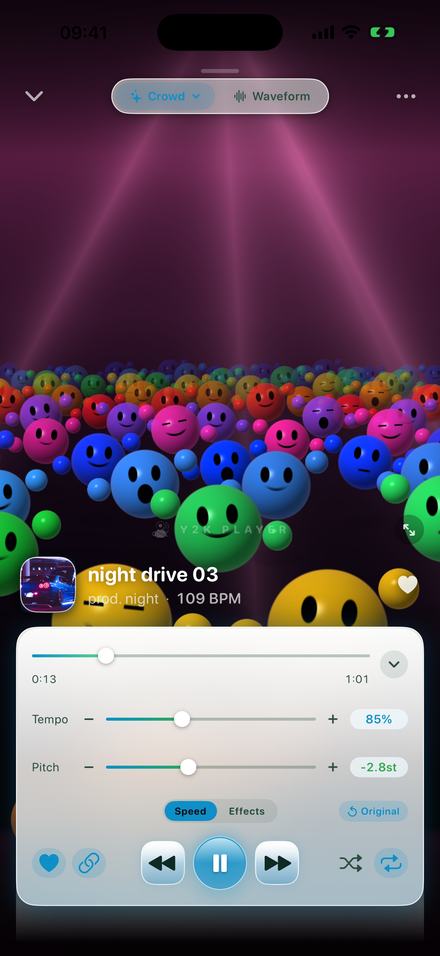
- Pull the tempo downOpen the player and drag Tempo. 85% is where this sound sits. The slider covers 50% to 150%, and the step buttons move 5% at a time, on to 25% and 200%.
- Decide what the key doesThe chain button links pitch to tempo. Linked, the key falls with the speed: 85% is 2.8 semitones down, which is the sound people mean. Turn it off and the tempo moves alone, pitch pinned at +0st.
- Switch the reverb onOn the Effects tab, turn Reverb on and pick a space: Air, Room, Chamber, Hall, Plate or Cathedral. Hall is the long washed-out one most people mean. Mix decides how much room you hear, and stops at 50%.
- Or start from the presetThe Presets row has Slowed + Reverb: one tap sets 0.85×, turns the reverb on at 34% Mix and widens the stereo image. Everything it touched is still a slider, and None puts the song back.
- Keep it, or export itThe settings belong to the song, so it plays that way every time you open it, and the original file is never rewritten. Export writes an M4A or a WAV, or a full-length MP4 if the destination only takes video.
The numbers, as the app uses them
- Tempo runs 25% to 200%. The slider covers 50% to 150% with 100% dead centre; the step buttons carry on past both ends in 5% moves.
- Pitch runs −12 to +12 semitones, in whole steps or quarter-semitone steps.
- Linked, pitch follows tempo exactly: twelve times the base-two log of the speed. 85% is −2.8 semitones, 125% is +3.9, 50% is an octave down.
- Reverb has six spaces — Air, Room, Chamber, Hall, Plate, Cathedral — and one Mix control that stops at 50%, because past that the room becomes the recording.
- The Slowed + Reverb preset is 0.85×, pitch linked, reverb at 34% Mix, stereo width 60.
- It opens MP3, M4A, WAV, FLAC and ALAC, and writes M4A (AAC), WAV, or MP4 video.
- iPhone and iPad, iOS and iPadOS 18 and later. Everything happens on the device.
How to tell whether a file is protected
Where does the song exist? If the only place you can find it is inside the subscription app, it is protected. If you can see it in the Files app and open it with something else, it is a plain file and it will import.
What does the importer do with it? In your music library a synced song and a subscription download look identical side by side. The importer separates them and counts what it skipped: import ten, be told four were skipped, and those four are the subscription's.
What this page will not do is describe a way around it. There is no setting and no trick, and anything advertising one is either working from a file you already owned, or asking you to break the terms you agreed to.
What this app is, and is not
- It is not a streaming service. No catalogue, no search for music you do not have. You bring the files.
- Music inside a streaming subscription cannot be imported. Protected downloads cannot leave the app that made them. Purchases, your own recordings, files people send you and audio pulled out of video all work.
- Tempo and pitch are free. The effect rack, reverb included, is what Pro adds. Free to use. Pro is one payment — forever.
- Your original file is never rewritten. Speed, pitch and effects are settings attached to the song, and one tap on Original puts it back.
- Nothing is uploaded. Importing, slowing, adding a room and exporting happen on the phone, with the connection off if you like. Free audio export writes the first 30 seconds; video export is full length on both tiers, with a small corner mark on the free one.
Questions about streaming, files and this sound
The answer to the first one is no. The rest is what to do about it.
Can I import songs from Spotify, or any other streaming subscription?
No. Downloads made inside a subscription are protected files that only their own app can decode, and no third-party app on the phone is given the key. That is equally true of every subscription service — it is how the licence works, not a shortcoming of one of them. Y2K Player plays audio files you already own.
Is there a workaround, a setting or a shortcut?
No, and this page will not point at one. Anything advertising a way to do it is either working from a file you already owned, or asking you to break the terms you agreed to when you subscribed.
Why did the app skip some songs when I imported from my music library?
Those ones were protected. The importer takes songs synced from a computer or bought as downloads, skips the protected streaming copies, and tells you how many it skipped so you are not left guessing.
If I cancel the subscription, can I edit the downloads then?
No. The downloads stop playing altogether once the licence ends. They were never files you kept.
What can I slow down, then?
Music you bought as a download, your own recordings, anything anyone sent you, songs synced to the phone as files, and the audio inside a video you already have. MP3, M4A, WAV, FLAC and ALAC all import, and so do whole folders.
How slow should a slowed and reverb edit be?
Most of this sound sits between 80% and 90%. The built-in preset uses 0.85×, which drops the key by 2.8 semitones at the same time. Below about 75% a song starts to sound stretched rather than slowed, which is a different taste — usually called daycore.
Does the key have to drop with the speed?
Only if you want it to. The chain button links them: linked, 85% is 2.8 semitones down, which is the slowed sound. Unlinked, the tempo moves on its own and the pitch readout stays at +0st.
Which reverb should I pick?
Hall is the long, washed-out one most people mean. Air is the smallest, Room is the default, Cathedral is the largest, and Plate is the bright studio one. Mix stops at 50% because past that the room drowns the song.
Is reverb free?
Tempo and pitch are free and always will be. The effect rack, reverb included, is what Pro adds. Free to use. Pro is one payment — forever.
Does any of this need a connection?
No. Importing, slowing, adding reverb and exporting all happen on the phone. Airplane mode changes nothing except that you cannot buy anything.
Will it change my original file?
No. Speed, pitch and effects are stored as settings attached to the song, and the audio you imported is never rewritten. One tap on Original puts everything back the way it was recorded.
Can I get a file out at the end?
Yes — an M4A or a WAV, or an MP4 video with your artwork if the destination only takes video. Free audio export writes the first 30 seconds; video export is full length on both tiers, with a small corner mark on the free one.
Does it work on iPad?
Yes, on iPhone and iPad, from iOS and iPadOS 18 onwards.
Where to go next
- Try it in your browserFree in your browser — works on files you ownOpen →
- Slowed and reverb, the soundThe preset, the six rooms, and which one to reach for.Open →
- Make it a videoArtwork over its own blur, full length, rendered on the phone.Open →
- Offline playerWhy none of this needs a connection or an account.Open →
- How to make audios for editsCutting to the hook, and getting a clean file into an editor.Open →
Start with a file that is yours.
Import it, pull the tempo to 85%, pick a room. Nothing leaves the phone.
Free to download and keep. Pro is a one-time purchase — buy it once and it never renews.