
Time stretching · iPhone & iPad
Change how fast it plays.
Not how high it sounds.
Time-stretching, in plain terms: the same voices, the same key, a different length — on the songs already on your phone.
The tempo slider and the pitch link are free. No account, nothing uploaded.
- the tempo range
- the smallest step
- pitch, where you left it
Why playing something faster makes it sound higher
Speed and pitch are not two separate properties of a recording. Changing one by the obvious method always changes the other.
A digital recording is a long list of air-pressure measurements taken at a fixed rate — 44,100 a second in a CD-quality file. Playing it back means handing those measurements to the speaker at some rate. Hand them over a quarter faster and every event arrives a quarter sooner, including the pressure waves that carry the pitch. A wave squeezed into less time is a higher note. Speed and pitch did not both change: one thing changed, and pitch is part of what you hear when it does.
This is the turntable effect, and it is exact rather than approximate. The shift in semitones is twelve times the base-two logarithm of the speed ratio — a formula you never have to use, but one that produces numbers worth recognising.
- 200% is twelve semitones up, a full octave.
- 150% is seven semitones up, a fifth.
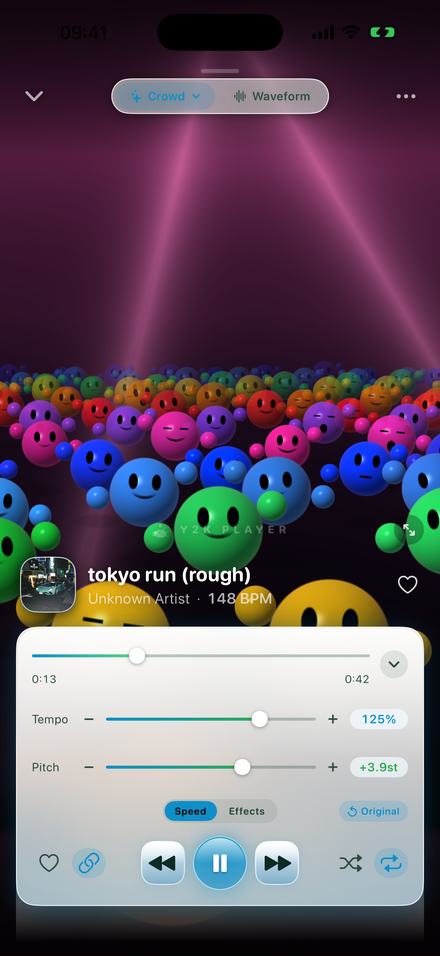
- 125% is 3.9 semitones up, near a major third.
- 85% is 2.8 semitones down.
- 75% is five semitones down, a fourth.
- 50% is twelve semitones down — an octave, the other way.
Sometimes that is the point: a sped up edit is meant to sound brighter. Often it is what spoils the job — a lecture at 150% where everyone sounds like a cartoon, or a guitar part at half speed so you can hear the fingering, now in a key your guitar is not tuned to.
Two ways to do it, and they are not the same job
Anything that changes playback speed uses one of two methods, and knowing which you are getting explains most complaints about the result.
Resampling: reading the file faster
The samples are consumed at a different rate and nothing else happens. Nothing is invented, so what comes out is as clean as what went in — the digital version of spinning a record at the wrong speed. It is also the method that always moves the pitch, by exactly the amounts above.
Time-stretching: rebuilding the sound at a new length
To make a recording longer without lowering it, the software has to produce audio that was never recorded. It breaks the signal into short overlapping windows, works out the frequencies in each, and lays them back down at new spacing with their phase kept continuous so the result does not click or warble; to shorten it, windows are overlapped and dropped instead. This is a phase vocoder — the technique behind every “preserve pitch” checkbox you have ticked. It is real processing rather than a free switch, but it is the only way to play a recording faster and still hear the same instruments.
Which one you get in Y2K Player
A chain button beside the transport controls decides it. With the link on, the tempo slider drives the resampler: pitch follows speed, and the pitch readout moves on its own to show where it landed. The two are one dial seen two ways, so dragging the pitch slider in this mode moves the tempo instead.
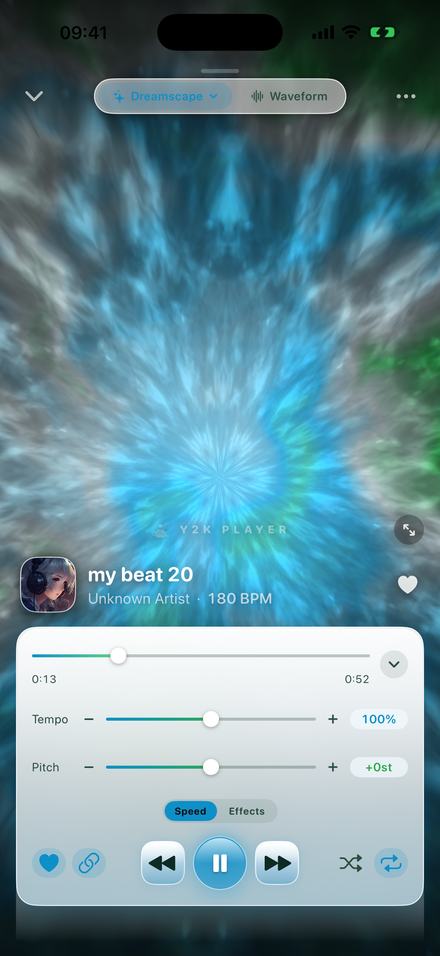
With the link off, the tempo slider drives the time-stretcher. The duration changes and the pitch readout stays at +0st however far you push it. That is the setting this page is about.
How to do it
About a minute, and the song keeps playing the whole time — you listen to the change rather than rendering it and hoping.
- Add a file you ownTap Add and pick an audio file, or share it into the app from wherever it lives. A video file works too — the app takes the audio out of it.
- Turn the pitch link offTap the chain button beside the transport controls. With the link on, the tempo drives a resampler and the pitch follows it. With it off, the tempo slider becomes a time-stretcher and the pitch readout stays at +0st no matter how far you go.
- Move the tempo while it playsThe slider covers 50% to 150% with 100% at dead centre, and the buttons either side step in 5% and carry on out to 25% and 200%. Nothing pauses and nothing re-renders; the change happens under your finger.
- Go in small steps and stop earlyTake it to where the job is done rather than as far as it will go. The further you push, the more you hear the stretching itself — drums lose their edge first.
- Read the numbers, not the sliderThe percentage is printed in full, the BPM under the title is multiplied by your speed, and the time remaining is real listening time. A tap on Original puts the song back to how it was recorded.
- Leave it, or export itThe speed is stored with that song, so it plays that way from now on and no other track is affected. Export writes it into an M4A or a WAV — the first 30 seconds free, the whole song with Pro.
What it looks like when the link is left on
Any number other than +0st under Pitch means you are hearing the turntable, not the stretcher.
What time-stretching costs, honestly
Every tool that does this has the same limits, because they all do roughly the same thing. Nobody tells you where they are, so:
Small moves are effectively free. Between about 90% and 110% there is very little to notice, and that is the range most people need.
Attacks soften first. The hardest thing to stretch is a sound that begins instantly — a snare, a plucked string. The first sign you have gone too far is usually drums that have lost their edge, not anything obviously broken.
Long sustained sounds go watery. Cymbal decays, reverb tails and held vocal notes take on a faintly phasey, underwater quality as the stretch grows. It is a texture rather than a glitch, and once you hear it you cannot stop.
Dense material suffers more than sparse. A voice and a guitar stretch further than a loud, heavily compressed mix, because there is less overlapping material to smear together. Speech is the most forgiving of all, which is why podcast apps have got away with it for years.
The “wrong” method is sometimes the better one. If you want a song faster and do not mind it brighter, leave the link on: that path is a resampler, so there is no processing to hear.
One detail specific to this app: tempo and pitch are handled by two separate units in the audio chain, and the work is split so the ordinary cases stay pure. Linked is pure resampling. A plain speed change with the pitch at zero is pure time-stretch. Only doing both at once puts both units to work.
Speeds people actually use, in both directions
The range runs from 25% to 200%. Nearly all the useful work happens in the middle third.
Slower, with the key held
90–95% takes the hurry out of a track without announcing itself. 70–85% is the working range for learning a part by ear or following speech in a language you are still learning: slow enough that notes and syllables separate, fast enough to still feel like music. 50–65% is transcription territory, where you are counting rather than listening — the processing is plainly audible down there, and that is a fair trade.
Faster, with the voices unchanged
110–125% gets you through a recorded lecture, an audiobook or a long interview you own without anyone sounding like a chipmunk. That is the most common reason people come looking for this control. 130–150% is skimming: speech holds up remarkably well, music generally does not.
Matching two tracks is its own use. The BPM figure under the song title is multiplied by the current speed, so it reads the tempo you are hearing. Nudge one track until its number matches another's and the two run together, neither having changed key.
If the key moving is fine — or is the point — those jobs have their own pages: sped up songs, slowed and reverb, nightcore. Moving the key while protecting the tempo is the opposite control.
Before you install anything
- The tempo slider and the link toggle are free. Nothing on this page is behind a payment.
- The range is 25% to 200%. The slider covers 50% to 150% with 100% at dead centre; the buttons either side step in 5% and reach the ends.
- Steps are 1% with fine control steps switched on in Settings, 5% with it off.
- The clock tells the truth. Remaining time, the lock screen scrubber and the BPM line all report at the speed you are playing — a four-minute song at 50% shows as eight minutes.
- The setting is stored per song, so a track set to 80% is at 80% next week and nothing else is touched.
- Free audio export writes the first 30 seconds with the speed rendered in; Pro writes the whole thing.
- It plays files you own. Music inside a streaming subscription cannot be imported: protected downloads cannot leave the app that made them.
- No account, no connection. All of the processing happens on the device.
Questions about speed and pitch
From people trying to slow a solo down, and people trying to get through a lecture.
Can I speed up a song without the voices going up?
Yes. Turn the pitch link off and the tempo slider stretches time instead of reading the file faster: the song gets shorter or longer and the pitch readout stays at +0st however far you move it.
How fast and how slow can it go?
From 25% to 200%. The slider itself covers 50% to 150% with 100% at dead centre, and the buttons either side of it step in 5% out to the ends.
What is the smallest change I can make?
1%, with fine control steps switched on in Settings. With it off the slider moves in 5% steps.
Why does the linked version sound cleaner than the unlinked one?
Because it is not processing anything. With the link on, the file is simply read at a different rate, which is effectively lossless — the same thing a record player does at the wrong speed. With it off, the audio has to be rebuilt at a new length, and rebuilding always costs something.
Does it work for slowing down as well as speeding up?
Yes. It is the same control in the other direction, and the same trade-off applies.
Does the song still show the right length?
Yes. Remaining time and the lock screen scrubber are both reported at the speed you are playing, so a four-minute song at 50% reads as eight minutes.
Does it tell me the new tempo?
The BPM printed under the song title is multiplied by your speed, so it shows the tempo you are actually hearing. For material with no steady pulse it shows nothing at all rather than guessing.
Will the setting still be there tomorrow?
Yes. The speed is stored with the song rather than globally, so one track at 80% leaves every other track alone.
Can I get a file out at the new speed?
Export it as M4A or WAV with the speed rendered in. Free exports write the first 30 seconds; Pro writes the whole song.
Can I change the speed and the key separately at the same time?
Yes. With the link off the two sliders are independent, so a track can be at 80% and two semitones down at once. That is a rehearsal setting more than a listening one.
Can I do this with music from a streaming subscription?
No. It plays files you own; protected downloads cannot leave the app that made them.
Does it need an internet connection?
No. There is no account and no server, and all of the processing happens on the device.
Does it work on iPad?
Yes, on iPhone and iPad running iOS or iPadOS 18 or later.
Where to go next
- Try it in your browserThe free browser tools — linked mode, right in the pageOpen →
- Slow a song down, keep the keyThe same unlinking, aimed at practising.Open →
- Change the key, keep the tempoThe opposite control, semitone by semitone.Open →
- Sped up songsWhen you want the key to move with the speed.Open →
- Works offlineNo account, no server, no connection required.Open →
Move the speed. Leave the key.
Open a track you already own, unlink the pitch, and drag the tempo while it plays. Free to use. Pro is one payment — forever.
Free to download and keep. Pro is a one-time purchase — buy it once and it never renews.