
Tempo, drive & chop · iPhone & iPad
The phonk sound,
and how people make it.
Where it came from, the five moves that carry it, and what you can and cannot do to a track that is already finished.
Free to use. Pro is one payment — forever.
- tempo, with the pitch linked or free
- the EQ sits before the distortion
- detected, so the chop lands on the beat
What phonk actually is
Phonk grew out of people sampling the underground Memphis rap tapes of the 1990s — the cassette-dubbed end of that scene, not its polished records. The borrowed ingredients were specific: a cowbell carrying the melody, a heavy 808 under it, vocals sitting low and blurred, and the audible fact that the source had been copied one time too many.
What most people mean by the word now arrived later and faster: the cowbell driven until it breaks up, the drums harder, the whole thing built for short clips. The resemblance between old and new is mostly texture, and that is the useful thing to know before making any of it.
Because there are two separate jobs inside a phonk track. One is composition — the cowbell line, the drums, the sample. The other is treatment: what happens to finished audio afterwards. How far it is slowed, how hard it is driven, how much of its top end is thrown away, where it trips over itself and lands back on the beat.
Composition needs a DAW and a drum kit. Treatment does not, and it carries most of what a listener recognises. It is also what almost every phonk edit online is: a track that already existed, put through those steps.
The five moves that make a track sound like phonk
Strip the treatment down and it is five things, and the order two of them sit in changes the result more than either one alone.
1. Slowed, with the pitch attached to it
Not slowed while holding the key. The pitch has to fall with the speed, the way it does when a tape is played back slower than it was recorded, because the drop in pitch is what makes a voice sound heavy rather than merely late. Slowing to 72% takes the whole track 5.7 semitones down — nearly half an octave. That is a real key change, and it is the point of the exercise.
2. A half-time feel
These tracks are usually counted fast and felt slow: hats and cowbell run at the counted tempo while the kick and snare land half as often. It is why tempo detectors argue about the genre — the dominant pulse and the production tempo differ by a factor of two, and both answers are defensible. That matters here because anything locked to the beat has to be locked to the right one.
3. Saturation, weighted to the bottom
The distortion is not fuzz. It is a soft clip — peaks rounded off rather than sliced — with the low end pushed into it harder than the rest. Boost the bass and then drive it and you get a fat 808 breaking up. Drive first and boost afterwards and you get a loud, harsh, full-range mess. Same two controls, opposite order.
4. Bandwidth thrown away
The tape-dub quality is mostly a missing top end plus a little smear. You do not need to add noise to get it; you need less of the signal than you started with. Rolling the ceiling down and letting some quantisation in reads as “old copy” to almost anybody.
5. Something that breaks the grid
The chopped-and-screwed lineage shows up as stutters, rewinds and sudden half-time drops that land on the beat and then hand the track back. On the grid they sound like a person playing. Off it they sound like a fault.
What treating a finished track cannot do
Once a track is mixed down, everything inside it moves together. You can make the whole thing slower, darker and dirtier. You cannot:
- add a cowbell that was never played;
- drive the 808 without also driving the vocal sitting on top of it;
- pull the drums away from the sample to treat them separately;
- add tape hiss or vinyl crackle — degrading a signal and generating a new one are different jobs.
To write phonk you need a DAW, a cowbell, an 808 and a drum pattern, and no player substitutes for that. To take something you already have and make it belong in that world, the five moves above are the whole job, and a phone is enough to do them.
Doing it, one step at a time
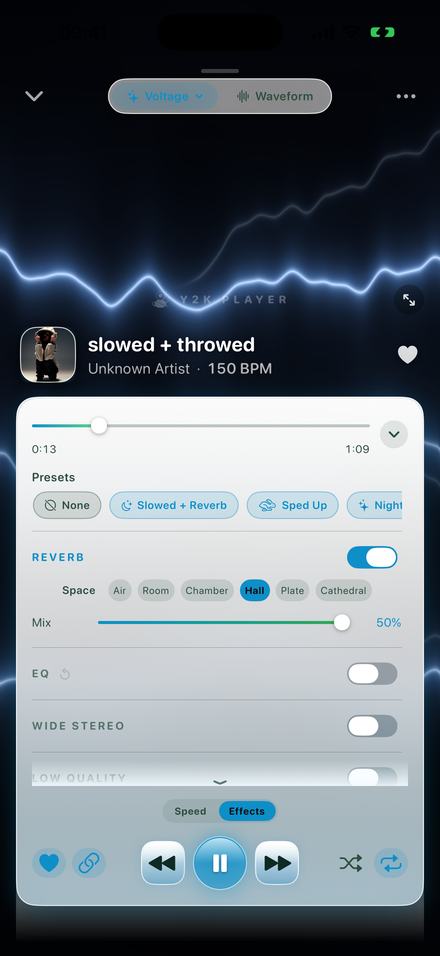
Y2K Player is a music player for files you already own, with these controls on the playing screen. There is no phonk preset in it. The nearest start is one called Distorted — 94%, drive at 46, a low-end lift feeding it — and it is a beginning, not the sound.
- Get the track inTap Add and pick the file from Files, or share it into Y2K Player from wherever it lives. MP3, M4A, AAC, WAV, AIFF, FLAC and CAF all import, and a video file works too — the app pulls the audio out of it and leaves the video alone. Nothing is uploaded anywhere.
- Let it find the beatThe tempo pass runs on its own and caches both a BPM and where the first downbeat falls. It searches 58 to 215 BPM, reads up to 70 seconds from inside the file, and returns nothing rather than a wrong number. The figure under the song title is that tempo multiplied by your current speed.
- Slow it, with the pitch attachedOpen the player and drag Tempo with the link switched on. 94% is where the built-in Distorted preset sits; 72% is where Chopped sits. Linked, the pitch falls with the speed — 12 × log₂ of it — so 94% is 1.1 semitones down and 72% is 5.7.
- Lift the low end firstOn the Effects tab, switch EQ on and tap the Bass curve: +6 dB on the 80 Hz shelf, +4 dB at 250 Hz. Then move the five faders by ear. This has to happen before the drive, and in the signal path it does.
- Add drive, not fuzzSwitch Distortion on and raise Drive. It is a tanh soft clip with a tone filter that closes as you push it, from 12 kHz open down to about 4.5 kHz at the top, so heavy settings get darker rather than spikier. It is level-matched, so the toggle compares tone and not volume.
- Take the shine offLow Quality drops a bandwidth ceiling from about 15 kHz and adds a slow phase smear; Bitcrusher steps the resolution from 16-bit down to 3-bit. Both have a Mix. Small amounts do the work — this is texture, not the effect.
- Break the gridSwitch Chop on. It locks to the detected beat. Style Half drops the track into half time, Rewind runs the tape back, Stop kills it like a dying deck, and Cycle picks between them. Size sets the slice — 1/2, 1/4, 1/8 or 1/16 of a beat — and Chance decides how often one fires.
- Keep it, or render itEverything is stored against that song and applied every time it plays; the original file is untouched. Save the whole chain as your own preset to reuse it, or export the result as M4A or WAV.
The controls, and what they really do
- Tempo runs 25% to 200%. The slider covers 50% to 150% with 100% dead centre; the buttons either side step 5% and reach the rest. Fine control drops the step to 1%.
- Pitch runs −12 to +12 semitones in whole steps, or quarter-tones with fine control. With the link on, tempo and pitch are one dial seen twice: the shift is 12 × log₂ of the speed, so 94% is 1.1 semitones down and 72% is 5.7.
- EQ is five bands — a shelf at 80 Hz, bells at 250 Hz, 1 kHz and 3.5 kHz, a shelf at 10 kHz — each running −12 to +12 dB. The Bass curve writes +6 dB at 80 Hz and +4 at 250.
- Distortion is a tanh soft clip with a tone filter that closes as you drive it, from 12 kHz open down to roughly 4.5 kHz at the top of the dial. It is level-compensated, so toggling it compares tone rather than loudness.
- The EQ sits before the distortion in the signal path. That is the order you want: whatever you lift is what gets saturated.
- Low Quality pulls a bandwidth ceiling down from about 15 kHz, adds a slow phase smear, and lets grit in past mid-travel. Bitcrusher goes from 16-bit down to 3-bit, with sample-and-hold on top.
- Chop locks to the song’s own grid. Slice sizes are 1/2, 1/4, 1/8 and 1/16 of a beat; the styles are Stutter, Rewind, Stop, Half, Hold and Cycle; Chance decides how often one fires. With no BPM it falls back to half a second rather than going silent.
- Tempo detection searches 58 to 215 BPM, reads up to 70 seconds from inside the file, and returns nothing rather than a wrong number. Files over twelve minutes are refused — one tempo for an hour of different songs is a lie. The figure shown under the title is the detected tempo multiplied by your speed, so it is the BPM you are actually hearing.
- Tempo and pitch are free. The effect rack — EQ, Distortion, Low Quality, Bitcrusher, Chop — is what Pro unlocks.
What usually goes wrong
Too much drive. Saturation flatters a track for ten seconds and fatigues it afterwards. The whole Drive dial is mapped into the range that stays musical, and even so, most of what sounds right lives in its lower half.
Slowing past the groove. Below roughly 70% the drums stop being a rhythm and start being separate events. The Chopped preset stops at 72% for that reason.
Chopping against the wrong grid. If the detector heard half or double the tempo you count — which is exactly the ambiguity a half-time feel creates — the repeats land in the wrong place and the effect sounds broken rather than deliberate. Read the BPM under the title before blaming the chop.
Every effect switched on at once. Drive, crush and Low Quality all take the same top end away. Pick the one doing the work.
Forgetting that none of it is destructive. Speed, pitch and the whole rack are settings attached to the song; the imported file is never rewritten, and one tap puts it back. Exporting is a separate step: M4A or WAV, rendered through the same chain in the same order.
Try it on something you already own
All of it happens on the device, on files that are already yours. Free to use. Pro is one payment — forever.
Questions people actually ask
The honest answers, including the ones where the answer is no.
Is there a phonk preset?
No. The built-in presets are Slowed + Reverb, Sped Up, Nightcore, Distorted, Chopped, Rewound, Lo-Fi and Dreamy. Distorted is the nearest starting point — 94% with the drive at 46 and a low-end lift feeding it — and Chopped is the screwed one, at 72% with the chop cycling styles. Build the chain you want on top of either and save it as your own preset; it is stored with your presets rather than with one song, so it applies to anything.
What tempo should a phonk edit be?
There is no single number, because it depends entirely on the tempo of the track you started with. The useful reference points are the built-in ones: Distorted sits at 94%, Rewound at 80%, Chopped at 72%. Below about 70% the drums stop reading as a groove. The tempo slider is a percentage of the original, not an absolute BPM.
Does the pitch have to drop with the speed?
For this sound, yes. The link is on by default and it is what makes the vocal sit heavy instead of just late — the shift is 12 × log₂ of the speed, so 72% is 5.7 semitones down. Switch the link off and the song slows while staying in its original key, which is useful for practising and wrong for this.
Can I add a cowbell, an 808 or a drum pattern?
No. This is a player: it changes audio you already have and does not generate any. If you need to write the parts, you need a DAW and a drum kit. What this does is the treatment layer on top of a finished track.
Can it add tape hiss or vinyl crackle?
No, and it is worth being clear about the difference. Nothing here generates noise. Low Quality and Bitcrusher degrade the signal you fed them — a bandwidth ceiling coming down from about 15 kHz, a phase smear, resolution stepping from 16-bit toward 3-bit. That reads as an old copy to most ears, but it is subtraction, not an added layer.
How do I get the distorted-808 sound?
Order matters more than amount. Switch the EQ on and lift the bottom — the Bass curve puts +6 dB on the 80 Hz shelf and +4 dB at 250 Hz — and then raise Drive. In the signal path the EQ comes before the distortion, so the low end is what hits the soft clip hardest. The trade is honest: everything else in the mix is being driven too, because a finished track has no separate 808 to reach.
Why does the chop sound wrong on my track?
Almost always the grid. The chop locks to the detected BPM and downbeat, and phonk is exactly the genre where a detector can settle on half or double the tempo you count, because the cowbell and the kick disagree. Check the BPM shown under the title. If it is half or double what you hear, the repeats will land off the beat no matter what the other controls say.
Where do the songs come from?
Files you already own. Add them from Files or share them in — MP3, M4A, AAC, WAV, AIFF, FLAC and CAF, plus video files, whose audio track is pulled out on import. It does not import from a streaming service, and a protected download cannot leave the app that made it.
Can I export the result?
Yes, as M4A (AAC) or WAV, rendered through the same chain in the same order as playback. iOS ships no MP3 encoder, so there is no MP3 output. A free audio export covers the first 30 seconds; video export runs the whole song.
Does any of it need an internet connection?
No. Importing, tempo detection, the whole effect rack and rendering all happen on the device. Airplane mode changes nothing except that you cannot buy anything.
Where to go next
- Slowed and reverbThe neighbouring treatment: 85% with a room around it, and where the reverb spaces differ.Open →
- Chopped and slowed videoPut the finished sound under artwork and render a full-length MP4 on the phone.Open →
- Bass boostThe five-band EQ in detail — the shelf at 80 Hz that feeds the drive.Open →
- Slow down a songTempo on its own: linked to the pitch, or holding the key.Open →
- Nightcore, Daycore, Phonk: What the WordGlossary · Tempo, pitch and the words for themOpen →
Start with a track you already love.
Slow it, drive it, take the top off, let it trip over the beat. Nothing is rewritten and one tap puts it back.
Free to download and keep. Pro is a one-time purchase — buy it once and it never renews.