
Practice & transcription · iPhone & iPad
Slow the music down
until the notes separate.
A quarter speed with the key exactly where the record left it, and the two bars you cannot play looping until you can.
Free to use. Pro is one payment — forever.
- a quarter of the original speed
- Key unmovedwith the link switched off
- One loop, no gap12 ms crossfade at the seam
Why the notes only separate when you slow it down
Nothing is hidden in the recording at full speed. There is just no room between the events for your ear to sort them.
Work out how long the notes are and the problem stops being mysterious. A sixteenth note at 160 beats per minute lasts about 94 milliseconds — sixty divided by 160, divided again by four. A run of them is past you before you can name one, which is why you can hum a lick after two listens and still not know the third note. Halve the speed and each note lasts about 188 milliseconds: same attack, same pitch, same order, twice as much time between one event and the next.
Transcribing is not a memory problem, it is a resolution problem, and speed is the dial that changes it. Which makes the two things slow practice depends on both unglamorous: the pitch has to stay where the record left it, because you hold a tuned instrument, and you have to fence off two bars and hear them again without touching anything between repeats.
The key must not move, and by default it does
There are two ways to make audio play slower, and they are different operations with different consequences.
Read the file slower. This is what a turntable does when you slow the platter: every frequency falls with the speed, so half speed is exactly one octave down. It sounds natural, because it is the same waveform read at a different rate, and for practice it is useless: your guitar is still in E and the record has landed between keys.
Stretch the time and leave the pitch alone. The audio is analysed in short overlapping windows and re-laid further apart, so the song takes longer while every note stays on the frequency it was recorded at. This is the one you want: the fingering you work out at 50% is the fingering that works at 100%.
In Y2K Player the choice is one button — the link glyph beside the transport. Linked is the turntable behaviour, on by default because it is what most listeners want. Turn it off and the tempo moves alone: the song gets longer, the key does not move, and the pitch slider becomes a separate control you can leave at zero.
What stretching costs
Reading a file slower is arithmetically exact. Stretching is a reconstruction, and reconstructions smear attacks — the further down you go, the more a snare sounds like a brush. That is inherent to the method, and it is why you go only as slow as the passage needs. Two things push back here: peak locking stays on, so a note's harmonics hold in phase rather than drifting apart and hollowing out, and High-quality stretch in Settings, on by default, raises the analysis overlap from 8 to 24.
How slow is slow enough
Slower is not better. Slow enough to hear it, fast enough to still feel it.
90% to 75% is for a phrase you almost have: a fraction more time to place your fingers, groove intact. 50% is the working speed for anything genuinely fast, and most transcription happens there. Down to 25% is for the two bars that defeat you — a fast run, a fill, a bass line buried under everything. A quarter speed is the floor of the range, and a diagnostic tool rather than a practice tempo: below about half speed a passage stops being a phrase and becomes a list of separate events, so you can learn the notes perfectly and nothing about the timing.
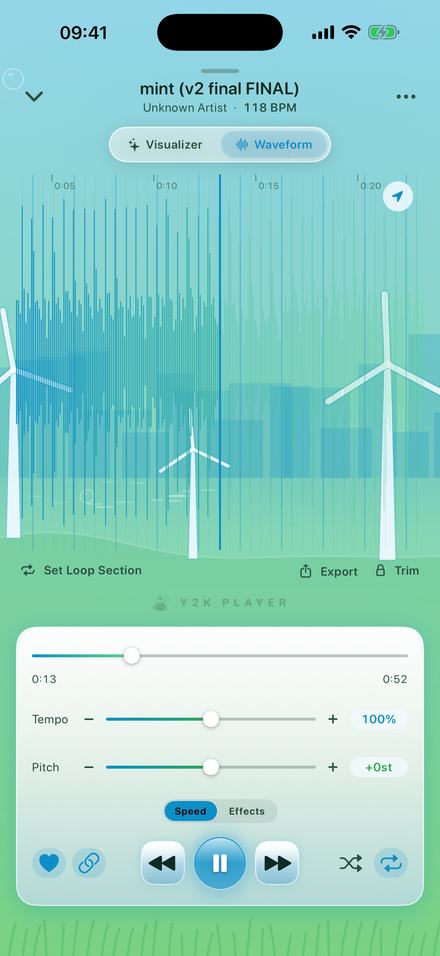
The tempo slider covers 50% to 150% with 100% dead centre; the minus and plus buttons step 5% at a time out to the engine limits of 25% and 200%. Fine control steps in Settings, on by default, moves the slider itself in 1% increments. Where a song's tempo has been detected, the BPM beside the title is multiplied by your current speed — a 118 BPM track at 60% reads 71 BPM — so you can name the tempo you are practising at.
Loop the bar, not the song
Tempo is half the method. The other half is never playing the twelve seconds before the part you are trying to learn.
Rewinding by hand is where the time goes: you scrub back, overshoot, land mid-phrase, hear the bar once, and do it again. Thirty repeats of two bars is normal; thirty rewinds is why people stop at eight.
On the waveform page, Set Loop Section drops a loop around the playhead — eight seconds of it — with two handles to drag. Pinch to zoom in first: it opens on roughly a twenty-second window and goes to near-sample detail, so you can see the attack you mean to start on. Tap anywhere to move the playhead there.
If the tempo was detected, a grid is drawn behind the waveform: a faint line on every beat, a stronger one every four, laid on the first downbeat rather than on 0:00. The handles do not snap, but you place them against drawn bar lines instead of by eye. The join is crossfaded over 12 milliseconds, and on short loops that fade shrinks to an eighth of the cycle, so even a one-beat loop stays gapless. One loop per song, saved with it, its ends stored in the original file's timeline — so changing the tempo stretches the loop with the music instead of sliding it off the bar.
The numbers you are working with
- Tempo: 25% to 200%. Slider 50–150%, buttons step 5%, slider steps 1% with fine control on.
- Pitch: −12 to +12 semitones, a quarter of a semitone at a time, shown to a tenth.
- Loop: one per song, dropped eight seconds long, draggable down to a tenth of a second.
- Files: MP3, M4A, WAV, FLAC and ALAC, from Files or a share sheet. Video files work too.
- Memory: tempo, pitch, link, loop and trim saved per song automatically; the original file is never modified.
- Offline: no account, no server, nothing uploaded. It works in a room with no signal.
Setting it up on one passage
Two minutes, most of it spent deciding where the bar starts.
- Add the fileTap Add in the library and pick the audio from Files, or share it into Y2K Player from wherever it lives. MP3, M4A, WAV, FLAC and ALAC all work, and a video file works too — the app takes the audio out of it.
- Turn the link offThe link glyph sits beside the transport. On, it is the turntable: the pitch falls with the speed. Off, the tempo moves alone and the key stays exactly where the record left it.
- Take the tempo downDrag Tempo, or tap the minus button for 5% at a time. You hear the change on the song already playing, so you can stop at the slowest speed that still feels like the phrase rather than guessing at a number.
- Fence off the passageOpen the waveform, pinch to zoom in on the bar, and tap Set Loop Section. A loop lands around the playhead; drag its two handles onto the start and the end of the part you are learning.
- Play it until it is yoursThe loop turns around without a gap, so the instrument never leaves your hands. Shorten it as the problem narrows — four bars to orient, one bar for the notes you keep missing.
- Walk the tempo back upFive per cent at a time, and only when the last one was clean twice in a row. The song keeps your tempo, key and loop for tomorrow, and the audio file itself is untouched.
Working the passage out
The slow loop is the tool. This is the method most people arrive at eventually.
Sing the phrase back before you touch the instrument; if you cannot sing it you have not heard it yet. Then find the first note and work forward by interval rather than naming every pitch cold — the loop is doing the repetition, so you can hold the instrument and hunt. Shorten it as you go: four bars to orient, one bar for the notes you keep missing.
If the record sits between pitches — a band tuned flat, an old transfer running fast — you do not have to detune your instrument to meet it. With the link off, the pitch slider moves the key without moving the tempo, a quarter of a semitone at a time, fine enough to pull a recording onto concert pitch against a tuner. It transposes on purpose too: put a part into a key your instrument likes and learn it there.
Getting it back up to speed
The part you can play at 50% is not yet the part.
Move up in small steps, only when the current one is clean twice in a row. Nothing is re-rendered between steps — you hear the change on the song already playing — so the tempo can walk up mid-repeat. Come back tomorrow and the song still has your tempo, key and loop: settings live with the song, not the session. Nothing was written into the audio file, so the day you want it at full speed, one number goes back to 100.
Questions from people learning a part
The ones that decide whether this actually works for you.
How slow can it go?
Down to 25% — a quarter of the original speed. The slider itself covers 50% to 150%, and the minus button steps 5% at a time past the end of it down to the floor. At that depth the audio is being reconstructed rather than replayed, so attacks soften: it is the speed you use to identify notes, not the speed you practise at.
Will slowing it down change the key?
Only if you let it. With the link on, the app behaves like a turntable and the pitch falls with the tempo — half speed is exactly an octave down. Turn the link off and the tempo moves on its own: the song gets longer, the key stays where it was, and a tuned instrument can play along with it.
Can I slow down a song from a streaming service?
No, and no app on any platform can — those downloads are protected and cannot be opened by another app. What works is audio you own as a file: a purchased download, a rip of your own disc, something you were sent, or a recording you made yourself.
Can I loop a single bar?
Yes. Set Loop Section drops an eight-second loop around the playhead and you drag the handles in from there; the shortest the handles allow is a tenth of a second. The turnaround is crossfaded, so a short loop repeats without a click instead of stuttering. One loop per song, saved with the song.
The recording sits flat against my piano. Can I fix that?
Yes. With the link off, the pitch slider shifts the key without touching the tempo, in quarter-semitone steps across −12 to +12 semitones and shown to a tenth of a semitone. That is fine enough to pull an old transfer onto concert pitch, and it is also how you move a part into a key that suits your instrument.
Does it remember the setting for each song?
Yes, automatically. Tempo, pitch, link state, loop and trim are stored per song and reload with it, so tomorrow’s session starts where today’s ended. Nothing is written into the audio file — the settings only describe how the song plays, so any of them can be undone.
Does it need an internet connection?
No. There is no account and no server; the audio is on the device and everything happens there. It works in airplane mode, in a rehearsal room, in a basement with no signal.
Is there a metronome or a count-in?
No. There is no click track and no count-in. What it does give you is the song’s detected tempo — multiplied by whatever speed you are playing at — and a beat grid drawn behind the waveform, a line on each beat and a heavier one every four, so you can see where the bars fall while you place a loop.
Can I export the slowed version to practise elsewhere?
You can, though for practice you rarely need to: the setting lives with the song and plays back that way every time you open it. Free export writes the first 30 seconds; Pro exports the full length as M4A or WAV.
What does it cost?
Free to use. Pro is one payment — forever. The tempo, the pitch slider, the link toggle, the loop, the trim and the waveform are all in the free app; Pro adds the effect rack, full-length export and the rest of the themes and visualizers.
Where to go next
- Try it in your browserFree in your browser — slow it to learnable speed nowOpen →
- Slowing a song without changing pitchThe same control described from the sound rather than the practice room.Open →
- The pitch slider on its ownSemitones, and what moving the key does to a recording.Open →
- Working offlineNo account, no server, nothing to sign in to.Open →
- What Pro addsOne payment, and exactly what it unlocks.Open →
- Can You Slow Down or Add Reverb to StreaStreaming and ownership · iPhone & iPadOpen →
Slow it down. Loop the bar. Play it until it is yours.
Free to use. Pro is one payment — forever.
Free to download and keep. Pro is a one-time purchase — buy it once and it never renews.