
Reverb · iPhone & iPad
Add reverb to a song
while it plays.
Air, Room, Chamber, Hall, Plate, Cathedral — pick one and it is around the track mid-bar, on the audio files already on your phone.
Free to use. Pro is one payment — forever.
- the wet/dry Mix range
- 0.35–7.1 sAir to Plate, measured
- where Mix starts
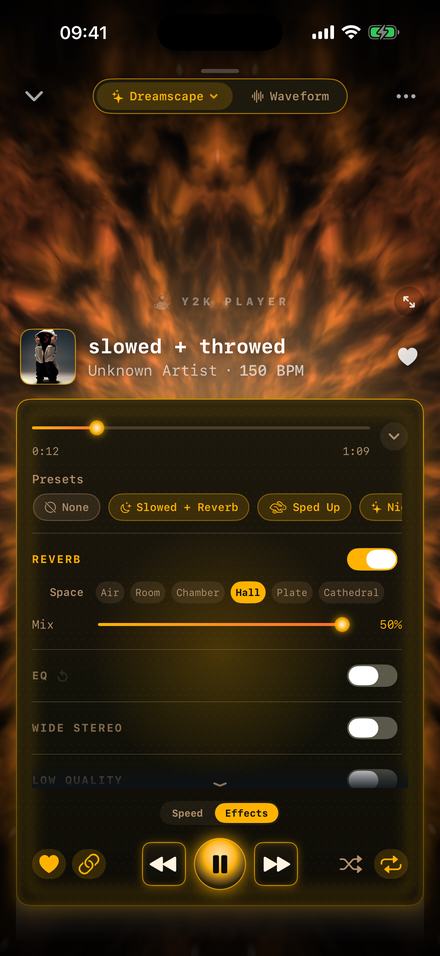
What reverb is actually doing to the song
It does not change a single note. It changes the place the notes appear to be happening in, by playing you a decaying copy of the song underneath the song.
Every real room answers back. A sound leaves a speaker, meets walls, floor and ceiling, and returns thousands of times over — quieter, later and duller each time, until it falls below what the ear can pick out. A reverb manufactures that answer and lays it under the original. The recording is the dry signal, the manufactured room is the wet one, and the only question you ever really answer is how much of each you want.
That question is the Mix slider. Everything else — how long the tail runs, how dense it is, how fast the top end dies out of it — was settled when you picked a space, which is why the panel puts the Space row above Mix.
The thing it cannot do
Reverb is addition, never subtraction. Nothing here takes a room out of a recording made in one, because that room is already printed into the file as ordinary audio with no way to tell it apart from the music. If a vocal arrives sounding like a stairwell, it stays a stairwell. What you can do is build a larger, more deliberate room around it, so the stairwell reads as part of the sound.
How to add it
A minute, and every step lands while the song carries on playing.
- Bring the file inTap Add, or share the file into Y2K Player. MP3, M4A, AAC, WAV, AIFF, FLAC and CAF all import, and a video file gives up its audio track on the way in.
- Open the Effects tabAt the foot of the player, switch from Speed to Effects. Reverb is the first group in the rack, sitting above EQ.
- Switch Reverb onThe toggle acts on the audio already playing. The room arrives mid-phrase, with nothing to render and nothing to wait for.
- Choose the spaceThe Space row runs Air, Room, Chamber, Hall, Plate, Cathedral, shortest tail on the left. Tap along it while the song plays and choose by ear rather than by name.
- Set the MixMix balances the room against the dry song. It starts at 30% and stops at 50%. Double-tap the slider to put it back to 30.
- Keep it, or export itThe setting belongs to that song and is still there the next time you open it. Export writes an M4A or a WAV with the reverb in it; export to video renders an MP4.
The spaces, and what each one is for
Separate rooms, not one room at several strengths. The tails were measured on the device, on a single click played through each.
Air to Cathedral, shortest first
- Air — 0.35 s. Barely a room. Nobody will identify it as reverb; they will notice the recording stopped sounding like it was made against a wall.
- Room — 0.95 s. Where every song starts before you choose. Tight, clean, and short enough to stay out of a fast track’s way.
- Chamber — 1.25 s. Longer and noticeably denser. Puts weight behind a drum without blurring where the beat is.
- Hall — 2.95 s. The long, obvious one. One bar is still ringing when the next begins, and that overlap is the effect people are usually after.
- Plate — 7.1 s. Bright, metallic, enormous. Usable at a low Mix; push it and the song stops being a song.
- Cathedral — longer than any of them. The room becomes the subject; the music is merely what set it off.
Moving right always means moving further away, and there is a quick way to tell when you have gone too far. The player prints the song’s detected tempo under its title, and sixty divided by that number is one beat in seconds. On the 150 BPM track pictured above, Hall’s tail covers about seven beats. On a slow song that reads as space; on a fast one, as fog.
How far to push the Mix
It arrives at 30%, it stops at 50%, and both numbers are opinions the app is willing to defend.
The ceiling is the interesting one. Half the slider is missing on purpose: past halfway the manufactured room is louder than the record it was built around, and every song treated that way arrives at the same washed-out place. Cutting the top half off leaves only positions you might actually use.
For a second opinion on how much is enough, the presets each commit to a number. Lo-Fi asks for 18. The chopped preset takes 22 and the rewind preset 26, both restrained so the stutters stay legible. Slowed + Reverb sits at 34. Dreamy, the wettest preset, goes to 44.
Two mechanics worth knowing. Double-tapping the Mix slider puts it back to 30, so there is always a way back. And switching Reverb off clears nothing — the space and the mix stay where you left them, so turning it on again returns the same room.
Where the reverb sits in the chain
Order is not a detail. Three useful things follow from where this effect was placed.
A song is handled in a fixed sequence: speed and pitch first, then the equaliser, then the character effects, then the reverb, then the stereo widener, then your ears.
The EQ is upstream, so it shapes what goes into the room. Pull the 10 kHz band down and the tail turns dark and distant, because the reverb never receives that brightness. Lift the 80 Hz shelf and the room booms, since low end is what it is being fed. That is a more precise way to change a room’s character than swapping it for another one.
Wide Stereo is downstream, so it widens the tail as well as the song. The reverb decides how far away the walls are; the widener decides how far apart.
Tempo changes happen before all of it, so the room never slows down. A tail is 2.95 seconds at any speed. Slowing a track does not stretch its reverb — it stretches the bar the reverb has to fit inside, which is why a slowed song carries a bigger room than the same song at its recorded speed. That relationship is the mechanism behind the slowed and reverb sound.
Reverb on its own, with nothing else touched
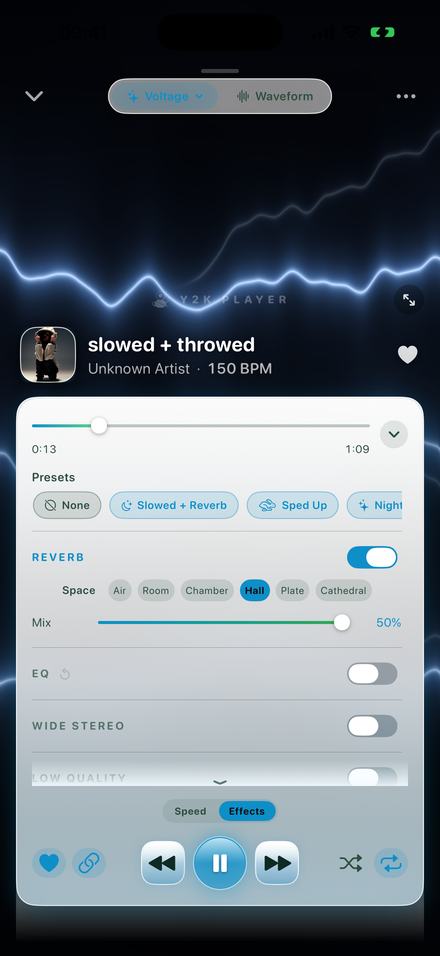
Most writing about this effect assumes you want the song slower too, and often that is wrong. Leave the tempo at 100%, open Effects, switch Reverb on, pick a space. That is the whole procedure — in the picture above, everything below Reverb is untouched.
It is the right thing to reach for on a dry voice memo, on a demo recorded too close to the microphone, and on anything that should sit further back without changing key or length. Any audio the app reads will take it: MP3, M4A, AAC, WAV, AIFF, FLAC and CAF, plus the soundtrack of an MP4 or MOV, lifted out on import and filed as a song.
Whatever you settle on belongs to that track and nothing else. Come back a month later and it still plays in the room you built; the Original button clears it in one tap without throwing the settings away. And export bakes the reverb in exactly as you heard it — M4A or WAV for audio, or an MP4 carrying your artwork for anywhere that only takes video.
Said plainly
- The effect rack is what Pro buys, reverb included. Tempo and pitch stay free. Free to use. Pro is one payment — forever.
- Nothing is uploaded. The engine runs on the phone, so all of this works with the device in airplane mode.
- Your file is never rewritten. The space and the mix are stored beside the song as settings; the audio you imported is only ever read.
- Free audio export writes the first thirty seconds. Pro writes the whole song. Video export is full length on either.
- There is no MP3 on the way out, because iOS ships no MP3 encoder. M4A and WAV go anywhere an MP3 would.
- Music that lives inside a streaming app cannot be brought in. Those downloads are sealed to the app that made them. This works on files you own.
Questions about adding reverb
Answered here rather than after you have installed something.
How do I add reverb to a song on an iPhone?
Import the audio file, open the player, switch from the Speed tab to Effects, and turn Reverb on. Pick one of the spaces in the Space row, then set Mix. The song never stops and nothing is rendered first — the room appears around the audio that is already playing.
Which space should I pick?
Room if you only want the recording to stop sounding boxed in. Hall for the long, obvious tail most people picture when they say reverb. Air when the fix should be inaudible. Plate and Cathedral are enormous, and want a low Mix or they take the song over.
Why does the Mix slider stop at 50%?
Because beyond that the artificial room is louder than the recording it was built from, and every song treated that way lands in the same place. The cap keeps the whole slider usable instead of turning its top half into a setting nobody keeps.
Can I add reverb without slowing the song down?
Yes. Reverb and tempo are separate controls on separate tabs. Leave the tempo at 100%, switch Reverb on, and the track plays at its recorded speed in the room you chose.
Can I remove reverb from a recording?
No, and neither can anything else that works this way. A room recorded into a file is ordinary audio by the time it arrives, indistinguishable from the music around it. This adds a room; it cannot subtract one.
Does the reverb end up in the file I export?
Yes. The export runs the same chain you were listening to, so the space and the mix are rendered into the audio. M4A and WAV for audio, MP4 for video. Free audio exports cover the first thirty seconds; Pro covers the whole song.
Does it work offline, and does it change my file?
It runs entirely on the device, airplane mode included, with no account and nothing uploaded. Your file is copied in once and then only read — the space and the mix live beside it as settings, and the Original button removes them in one tap.
Where to go next
- Slowed and reverbThe same effect at 0.85×, which is the sound the genre is named after.Open →
- Bass boostThe EQ that sits upstream and decides what the room is fed.Open →
- Slowed and reverb videoPut the finished sound under artwork and render a full-length MP4.Open →
- What Pro addsThe rest of the rack, and everything that stays free.Open →
- Move a Song Into a Key You Can SingFor singers · iPhone & iPadOpen →
The room is one switch away.
Bring in a file you already own, open the Effects tab, and turn Reverb on. Free to use. Pro is one payment — forever.
Free to download and keep. Pro is a one-time purchase — buy it once and it never renews.