
For singers · iPhone & iPad
Find the key you can
actually sing it in.
A recording sits in one key and your voice sits in another. Moving the recording is a slider, and you can set it while you are singing over it.
Free to use. Pro is one payment — forever.
- semitones, either direction
- the fine step on the slider
- the tempo never moves
A song has a range, and so does your voice
Transposing does not make a song easier. It slides the whole thing, both ends at once, until the part you could not reach is the part you can.
A recording sits wherever the singer who made it put it. The highest note in the last chorus and the lowest note in the first verse are a fixed distance apart, and nothing done to the file changes that distance. Moving the song down three semitones moves the ceiling down three and takes the floor down three with it.
Which is why “just sing it lower” is not automatically the answer. Drop the song far enough to rescue a chorus you were straining at and the verse can end up under your floor, where the notes are technically there but nothing is behind them. The key that fits is the one where both ends land inside your range — usually a band two or three semitones wide rather than one correct answer.
What a semitone is, in case nobody ever said
A semitone is the smallest step in Western music: one fret on a guitar, one key on a piano counting the black ones. Twelve of them make an octave. You do not need to know what key the recording is in to move it — the number you set is a distance from wherever it already was. Read it off afterwards, when somebody in the band asks.
Test the hardest bar first, not the first bar
The usual way wastes twenty minutes: start at the top, feel fine through the verse, meet the chorus a minute later, adjust, start again.
Find the highest sustained note in the song instead — in most arrangements it is in the last chorus, after the key change if there is one — and set the key there. Everything below it follows. Then, and only then, go back and check the bottom of the verse.
How to tell you are in the wrong place
- Too high is easy to feel and easy to ignore: the chin lifts, the shoulders come up, and the note thins out or breaks at the end of a phrase. If it needs a run-up to land once, it will not land twice.
- Too low is quieter and sneakier. The note is there, but there is no weight behind it, consonants stop carrying and the line turns into speech.
- Right is boring while you are doing it. You can sing the top note twice in a row, and you stop thinking about it.
Two things that will fool you
A cold voice sits lower than a warm one. Choose a key at nine in the morning and you may have outgrown it by the second run-through. Warm up first, or expect to move it up a semitone later.
Headphones flatter you. Singing along in headphones, you hear yourself through your own skull — louder, rounder and closer than anyone else hears it. Keys chosen that way tend to come out a semitone too high, so check the one you picked out loud, once, with the track on a speaker.
Doing it while the song is playing
About a minute, most of it spent singing rather than tapping.
- Add the songTap Add and pick the file, or share it into the app from wherever it lives. Backing tracks, karaoke versions and full recordings all behave the same way, and a video file works too — the audio is taken out of it.
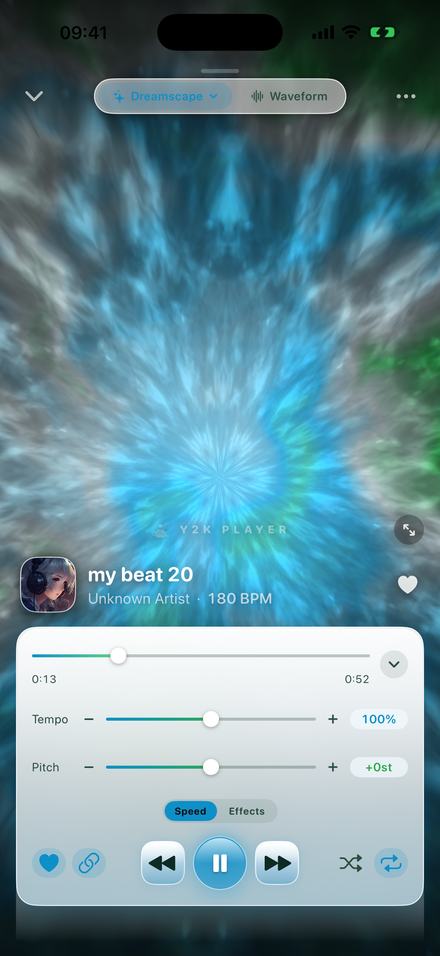
- Unlink the pitch from the tempoTap the chain button beside the transport. With the link on, pitch and tempo move together, which is the slowed-down sound rather than a key change. With it off the tempo stays at 100% and the pitch slider becomes a control of its own.
- Skip to the hardest partScrub to the last chorus. The highest sustained note in the song is nearly always there, and setting a key anywhere else means finding out you were wrong a minute later.
- Sing, and step it downThe buttons either side of the Pitch slider move a whole semitone at a time — one fret. Keep singing while you tap: playback never stops, so you hear the same note land differently instead of guessing between takes.
- Check the bottom of the verseGo back and sing the lowest line. If it has gone breathy, come up a semitone and test the chorus again. The readout tells you exactly where you are, as −3st or +2.5st.
- Leave it thereThe key is stored with that song, so it opens in your key next time without being set again. Put the number in the song’s notes if you sing it with other people — they will ask.
The controls, with the real numbers
- −12 to +12 semitones. A full octave either way, on a slider that moves while the song plays.
- Quarter-semitone steps on the slider. Fine control steps is on out of the box; turning it off in Settings makes the slider move a whole semitone at a time.
- Whole semitones on the buttons. The minus and plus either side of the slider always move one full semitone, which is the step you want while choosing a key.
- The tempo stays at 100%. With the pitch link off, changing the key does not change the speed, and the song lasts exactly as long as it did.
- The readout is a distance, not a key name. It shows −3st or +2.5st, because the app does not detect what key a recording started in.
- The key is stored with the song. Set it once and that track opens in your key every time after.
- The pitch and tempo sliders are not behind a payment. Free to use. Pro is one payment — forever.
Four ways to move a song, and when each is the right one
Transpose the accompaniment
If a person is playing it, this is the cleanest answer there is: a capo on the guitar, the transpose button on a keyboard, a band reading the chart up a tone. Nothing is processed, so nothing can sound processed. It needs players and a rehearsal.
Find a version already in your key
Karaoke and backing-track sellers often cut the same song in several keys, and when yours exists that way it is ideal. Most do not, and the hunt takes longer than moving the track you already have.
Sing it an octave away
Free, instant, and the standard move when a song was written for a very different voice. It is also the trap: an octave is twelve semitones, and the distance actually needed is often five or seven. An octave down can drain a chorus of the thing that made it one.
Move the recording itself
Shift the audio and everything else stays as it was — same arrangement, same tempo, same length. This is the one that works with a file, a phone and nobody else involved, and because it happens while the song plays you can hold a note and move the track under it.
What moving a recording costs, honestly
Changing the pitch while keeping the length means rebuilding the audio: it is resampled to the new pitch, then stretched back to its original duration. On a phone, in real time, that is a good trick and not an invisible one.
One to three semitones is clean on most material — a listener would not name it as processing. Past about five, and especially upwards, voices take on a glassy edge and cymbals go metallic. Sparse travels further than dense: a voice and a guitar survive a bigger move than a loud, heavily compressed mix does, because there is less overlapping material to smear.
For singing this rarely matters: the move that fits a voice is nearly always inside four semitones, comfortably inside the clean range.
One limit worth stating plainly: the whole recording moves together. A backing track and the vocal over it are one signal, so there is no way to move the voice and leave the band.
Once you have found it, keep it
A key found on Tuesday and forgotten by Friday was not worth finding. The setting is stored per song, so the track plays at −3 next time it is opened, and nothing else in the library moves with it.
Two things help while you are still deciding. The waveform tab takes a loop — tap the loop button and an eight-second region lands around the playhead, with ends you can drag — so the bar that decides the key sits on repeat. And every song has a notes field: lyrics, a cue, or just “+2 for me”, which is what you want the evening somebody asks what key you sing it in.
If a song is both too high and too fast to learn, the two sliders are independent once the link is off, so it can sit at −2 semitones and 85% speed at once. When you need a file rather than a setting, export writes an M4A or a WAV with the key rendered in — the free export writes a song’s first 30 seconds, and Pro writes all of it.
Questions singers ask
Answered here, so the decision can be made before anything is installed.
How do I know which key suits my voice?
Test it on the highest sustained note in the song rather than on the opening line, then check the lowest note in the verse. The key that fits is the one where both ends are comfortable, and it is a judgement your voice makes rather than a number you can work out in advance.
How many semitones down should I go?
There is no universal number, because it depends on your voice and on where the song was written. Most people land between one and four semitones in either direction. Move a whole semitone at a time and stop as soon as the hard note stops being hard.
Does changing the key make the song slower?
Not with the pitch link switched off. The tempo readout stays at 100% and the song lasts exactly as long as it did — only the key moves.
How far can it move?
Twelve semitones in each direction, which is a full octave either way.
Can I move it by less than a semitone?
Yes. The slider moves in quarter-semitones by default, which is what you want for a recording that was never quite at concert pitch to begin with. The buttons either side always move a whole semitone, and turning off Fine control steps in Settings makes the slider do the same.
Does it tell me what key the song is in?
No. There is no key detection — the app shows the BPM it detected, but not the key. The number you set is a distance from wherever the recording started, which is all you need to sing it, and enough to work out the key if you know where it began.
Will it sound processed?
Inside about four semitones, on most material, no — and that covers nearly every move a singer needs. Beyond five, and particularly upwards, voices start to sound glassy and cymbals get a metallic edge. That is inherent to the technique rather than a setting.
Can it move the vocal and leave the backing where it is?
No. A finished recording is one signal and all of it moves together. Separating a voice from a mix is a different kind of tool entirely.
Do I have to set it again every time?
No. The key is stored with that song, so it plays in your key from then on, and every other song in the library is untouched.
Can I get a file in my key to send to the band?
Yes. Export writes an M4A or a WAV with the key rendered into the audio. The free export writes a song’s first 30 seconds; Pro writes the whole thing.
Can I use songs from a streaming subscription?
No, and no app on any platform can. Those downloads are protected and cannot be opened by another app. What works is audio you own as a file — something you bought, a backing track you were sent, or something you recorded.
Does it need an internet connection?
No. Everything happens on the device, with no account and nothing uploaded, so it works in a rehearsal room with no signal.
Does it work on iPad?
Yes, on iPhone and iPad running iOS or iPadOS 18 or later.
Where to go next
- Change the pitch on its ownThe control page: semitones, the range, and what unlinking does.Open →
- Slow it down without moving the keyThe other half of a rehearsal setting.Open →
- Working offlineNo account, and nothing leaves the phone.Open →
- What Pro addsOne payment, and what it unlocks.Open →
- Find the BPM of a SongTempo & key · iPhone & iPadOpen →
- Add Reverb to a Song on iPhoneReverb · iPhone & iPadOpen →
Sing it where your voice already is.
Free to use. Pro is one payment — forever.
Free to download and keep. Pro is a one-time purchase — buy it once and it never renews.