
Loops · iPhone & iPad
Loop a section of a song
so it repeats with no click.
Two different faults live at a loop point — a tick from the waveform and a stutter from the software. They have different fixes, and it is worth knowing which one you have.
The waveform and the loop tools are free to use. Pro is one payment — forever.
- 12 msequal-power seam
- 2 lapsqueued ahead, always
- Per songthe loop is saved with it
A loop is a jump, and everything that goes wrong lives in that one moment
The player reaches the end point you set and has to be at the start point on the very next sample. Two different faults hide in that jump, and they get confused with each other constantly.
The first is a click. Audio is a wave, and at any given instant it sits somewhere above or below the centre line. If the wave is halfway up at the end of your loop and halfway down at the start, the jump is a vertical step between those two values. Nothing physical moves like that, so the speaker reproduces the step as an event of its own: a tick on quiet material, a pop on busy material, and on a loud low note something closer to a thud you feel. It is the same size and the same shape on every lap, because it is a property of the two points you chose.
The second is a gap. This one is not in the file at all. A player has to hand the audio output the next piece of sound before the current piece runs out. If it only decides what comes next at the moment the loop ends, it is already late — the decision usually travels through the same thread that is drawing the screen, and that thread is busy. One heavy frame while something animates, and the output has nothing to play for a few milliseconds. You hear a stutter, or a short hole with silence in it.
Telling them apart takes one listen. A click is identical every time round, short and bright, and it survives turning the volume down. A gap wanders: it comes and goes, it is worse when the phone is doing something else, and there is nothing in it — no tick, just absence. Fixing the wrong one is the reason people move loop points for an hour and still hear a pause.
The three real fixes, and what each one costs
They address different halves of the problem, which is why a tool that does one of them still sounds wrong.
Move the loop points
The click disappears if both ends happen to sit at the same height on the wave — ideally where it crosses the centre line. Editors call this snapping to a zero crossing, and by hand it means zooming in until individual wave cycles are visible and nudging. It works, it is free, and it constrains you: the nearest good point may be a few milliseconds from the musical point you actually wanted. It also does nothing whatsoever about a gap.
The other half of moving points is musical rather than technical. A loop that is a beat and a half long will sound wrong even when the samples line up perfectly, because your ear is counting. Both ends want to be at the same position in the bar.
Crossfade the joint
Instead of butting the two ends together, overlap them: the last few milliseconds of the loop fade down while the first few milliseconds fade up in the same stretch of time. There is no step left to hear, because nothing jumps — one sound has replaced the other gradually.
Two details decide whether this sounds like a fix or like a new problem. The shape of the fade matters: fade both sides in a straight line and the middle of the overlap goes quiet, because two different signals at half volume each do not add back up to one at full volume. The standard answer is an equal-power fade, where each side follows a cosine or sine curve so the power stays constant across the join and the loudness does not dip. The length matters just as much. Too short and the step is still audible. Too long and you can hear both ends of the loop playing at once — a flam on a drum hit, a smear on a held note. A few milliseconds removes a click without ever being heard as an event.
Get the audio queued before it is needed
This is the fix for the gap, and it is purely about timing. Render the joint once, ahead of time, as a real piece of audio, and hand it to the output as part of the queue rather than deciding anything when the loop ends. Then keep more than one lap queued at all times, so a busy moment on the phone has a whole cycle of slack to recover in instead of a few milliseconds.
Setting the loop, start to finish
A minute on a song you already have, most of it spent deciding exactly where the bar starts.
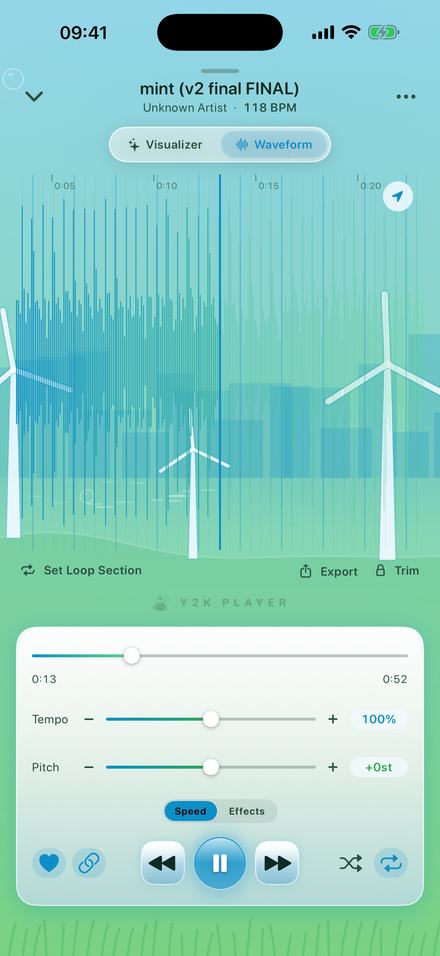
- Open the waveformIn the player, switch from Visualizer to Waveform at the top. The song is drawn out with a playhead you can tap to seek. Anything longer than 25 seconds opens zoomed to roughly a 20-second window around where you are; pinch out for the whole track.
- Park the playhead just before the sectionTap the waveform where the part you want begins. Getting close is enough — the handles are how you get exact.
- Tap Set Loop SectionA loop lands around the playhead, eight seconds long, clamped so it cannot run past a trim you have set. Playback drops into it immediately, so you are hearing the loop while you edit it.
- Drag the edges onto the sectionBoth ends of the shaded band are grips. Pinch in first: the further you are zoomed, the less time a millimetre of finger movement is worth. The band redraws under your finger and commits to the engine when you lift it.
- Use the bar linesOnce the tempo has been worked out, the waveform draws the song's own grid behind the wave — a faint line per beat, a stronger one every four. Putting both ends on the same place in the bar is what makes a loop sound intentional rather than early.
- Leave it runningLoop On and Loop Off switch it without losing where you put it; Clear removes it. The region is stored with that song, so tomorrow starts where today ended.
What happens at the seam, exactly
- The overlap is 12 milliseconds. The last 12 ms of the loop are mixed with the first 12 ms of the same loop.
- The mix is equal power: across the overlap the outgoing tail is scaled by a cosine curve and the incoming head by a sine curve, so the two always sum to the same power and the join does not dip in loudness.
- On a loop shorter than about 96 ms the overlap shrinks to one eighth of the loop, so short loops stay on the same path instead of falling back to a plain jump.
- That mixed piece is rendered once and kept. It is only rebuilt when you move a handle.
- It is read through a second handle on the file, so building it never disturbs the one the player is streaming from.
- Two laps stay queued at all times, and the next one is prepared while the current one is still playing. That is the part that removes the stutter.
- This is not a crossfade between two tracks. Nothing from another song, and nothing from elsewhere in this song, enters the join. It is one loop overlapping itself.
- Loop points are stored in the original file's own seconds, so changing the speed does not move them. The 12 ms is stretched along with everything else: at half speed you hear it as roughly 24 ms.
- The region is saved with the song, along with its tempo, pitch and trim. One loop per song.
If you meant the whole track, not a section
Plenty of people looking for a seamless loop want one song on repeat for an hour, which is a different job. The repeat button in the player cycles through repeat-all, repeat-one and off. On repeat-one the track wraps inside the audio queue rather than being reloaded from disk at the end — two complete passes stay queued, so the wrap has an entire song's worth of scheduling slack and never gaps.
There is no crossfade on that join, and that is deliberate: it is a straight butt join from the end back to the start. On a track that fades out and starts cold, that is silence meeting silence and there is nothing to smooth. On a track that stops abruptly, the honest fix is to move the start and end points with the Trim tool, which is what the wrap uses as its boundaries.
What a crossfade will not do for you
Worth knowing before you spend an evening blaming the software for something that is in the music.
It cannot invent a musical join. Twelve milliseconds is about a twentieth of a beat at most tempos. It removes the tick and it does not care whether your loop is a bar long or a bar and a third. If the repeat sounds like it arrives early, the loop is the wrong length, and the beat grid behind the waveform is there to fix that.
Anything still ringing at the loop end gets cut. A cymbal, a reverb tail, a held vocal note — if it is still sounding when the loop ends, you will hear the start of the loop arrive underneath it and then the tail vanish. The fix is to place the end where the tail has already decayed, or to accept it and let the loop start on something percussive that masks the change.
The loop is a playback setting, not an edit. Nothing is written to your file, ever — the same is true of speed, pitch and trim. That also means exporting gives you the trimmed range written once, not the loop repeated a hundred times into a long file.
It has to be a file you have. The app plays audio you already own, brought in through the Files app or shared into it from somewhere else. Downloads made by a streaming app are locked to that app and cannot be opened here, which is not a limit of the looping so much as a fact about those files.
Questions about loops and seams
The ones that decide whether the problem is your loop points or your player.
Why does my loop click every time it repeats?
Because the wave is at one height where the loop ends and a different height where it starts, so the jump between them is a vertical step. A step is not a sound anything makes, and the speaker renders it as a tick. It is identical on every lap, which is how you tell it apart from a stutter.
Why does my loop pause sometimes but not always?
That is a gap, not a click, and it is the software rather than the file. The player is deciding what to play next at the moment the previous piece runs out, and losing the race when the phone is busy. The fix is to have the next lap already queued rather than to move the loop points.
What is a loop crossfade?
An overlap at the join: the end of the loop fades down while the beginning of the same loop fades up over the same few milliseconds, so there is no step left to hear. It is not a crossfade between two tracks — only one piece of audio is involved, overlapping itself.
How long should the crossfade at a loop point be?
Long enough that the step is gone, short enough that nobody notices the overlap. A few milliseconds. Y2K Player uses 12 ms, shortened to an eighth of the loop when the loop itself is shorter than about 96 ms.
Can I loop a section of a song on an iPhone?
Yes. On the Waveform page, Set Loop Section drops a loop around the playhead and both edges become handles you drag onto the section you want. Pinch to zoom for finer placement. The region is remembered for that song.
Does the loop still work if I change the speed?
Yes. Loop points are stored in the original file's seconds, so slowing a song down or speeding it up leaves the section exactly where you put it — you simply hear it take longer or less time to come round.
Can I save the loop as a file that repeats?
No. Looping is a playback setting. Export writes the trimmed range once, so if you want that section as a file, set the trim to it and export it — the repeating stays in the player.
Where to go next
- Slow a song downTake the looped bar to 60% and keep it in the same key while you learn it.Open →
- Change the keyTwelve semitones either way, with the speed left where it is.Open →
- Slowed and reverbThe room, the tempo, and what the tail does to a loop point.Open →
- Playing offlineEverything here runs on the phone, with no account and no connection.Open →
- Export a Song as an Audio FileAudio export · iPhone & iPadOpen →
Set the loop once. Let it go round.
The waveform, the handles and the seam are all in the player, and none of it needs a connection. Free to use. Pro is one payment — forever.
Free to download and keep. Pro is a one-time purchase — buy it once and it never renews.