
Themes · Stargaze & Galaxy
Put the night sky
behind your music.
Stargaze is a clear night from the ground. Galaxy is the deep field. Both are drawn on the phone, frame by frame, behind the whole app — the shelves, the player, the sliders.
Free to use. Pro is one payment — forever.
- 12 fpsthe sky is drawn, not looped
- 9 minutesone turn of the spiral
- Offlinenothing to download
A photograph would have been easier
Every star in these two themes is computed while you are looking at it. There is no image file in either of them.
The usual way to build a space theme is to export a nebula at phone resolution, draw a list of songs over it, and stop. It photographs beautifully and dies within a week, because the same six bright stars sit in the same six places forever. A still image cannot twinkle, and a looping one announces itself the moment you spot where it joins.
Stargaze and Galaxy are code instead. Twelve times a second the app draws the whole sky again from scratch, on the phone, off a clock — no assets, no video, nothing fetched. That is what buys the things a picture cannot have: every star on its own twinkle rate and its own drift, a spiral that is genuinely turning, and no seam to find.
Stargaze: a clear night, seen from the ground
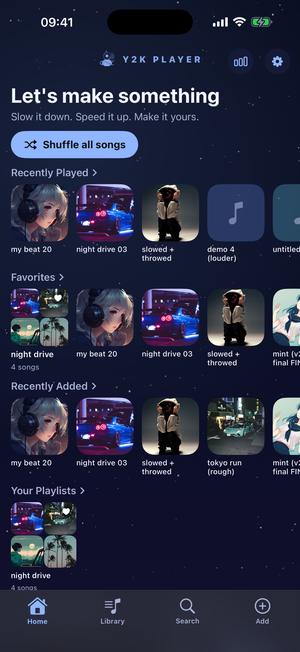
Navy falling into a deeper navy, pale blue and pale violet on everything you can press.
The field is a grid of fourteen rows by eighteen columns, and every star gets a cell and then a random nudge inside it. Purely random placement sounds better and is worse: one seed decides where the sky is empty and keeps it empty forever. The grid makes the sky even. The jitter stops it looking like a grid.
Sizes run deliberately wide, and only the brightest few carry a soft halo — the difference between a sky with depth in it and white speckle on a dark rectangle. Each star twinkles on its own clock and drifts sideways at its own speed, so nothing on screen pulses in unison.
Galaxy: the deep field, turning once every nine minutes
Violet at the top, near-black at the bottom, orchid and cyan on the controls, and a spiral that actually rotates.
The arms are grain, not shapes. An earlier version drew them as soft transparent discs and read as exactly that — a pile of circles — because a deep-field photograph is made of points, and its structure comes from where the tiny ones crowd. So each arm is hundreds of specks under two points wide, scattered along a spiral curve, tight on its spine and thinning away from it.
Then the details that separate a photograph from a painting. A dust lane goes down after the grain so that it covers it, in flat black with no lit rim, because occlusion is the one effect glowing paint can never fake. The core is the only soft, bright thing in the frame, and its white heart breathes over twelve seconds. The sharpest stars carry four-point cross glints, which is a lens signature rather than something a star does, and three tiny far galaxies sit off-centre so that space keeps going past the subject.
Two shooting stars cross on offset clocks — one roughly every thirteen seconds, one every twenty-one, each lit for about a second. They never arrive together, so catching one feels like catching one.
The spiral turns once every nine minutes. You notice that the way you notice a clock: not while it moves, but when you come back.
Putting one on
A song first. After that it is one tap.
- Get a song inThe Add tab has three doors: Import Songs for audio files and whole folders out of Files, From Music Library for what is already synced or purchased on the phone, and Import Video Sound to lift the audio off a clip. The sky is waiting whichever way you come in.
- Open the theme pickerIt is its own sheet, with the whole gallery in it. Every tile draws that theme’s actual sky, held still, so a star field looks like a star field before you commit to anything.
- Tap Stargaze or GalaxyThe app behind the sheet changes in the same moment — library, player, sliders, tab bar. No restart, no download, no progress bar.
- Give Galaxy a colourWith a tintable theme worn, a colour row appears at the top of the same sheet. Scroll it: the first entry keeps cycling on its own, and the rest are fixed positions around the wheel. Stargaze has no row, and is not supposed to.
- Close it and forget itThe choice sticks, and it is carried in your own iCloud, so a new phone opens in the sky you were already using. The songs stay on whichever device you imported them to.
The two skies, and two neighbours
The same screen, photographed the same way. Fathom and Cipher are here because people who come looking for space often stop on one of them instead.
Stargaze 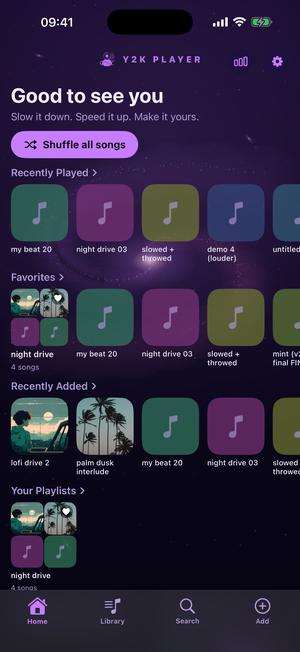
Galaxy 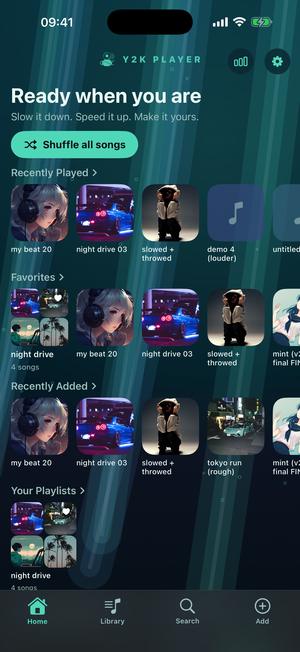
Fathom 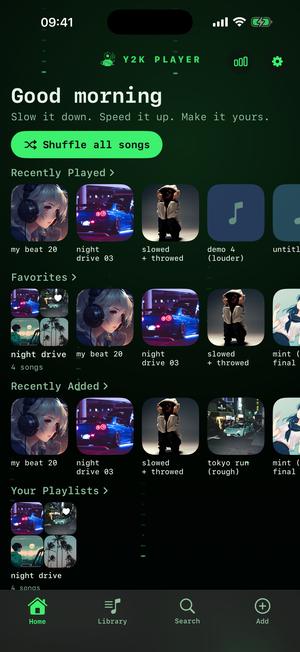
Cipher
Galaxy has a colour wheel. Stargaze does not.
One is about a single light. The other is about a relationship between two, and rotating both halves at once would ruin it.
While Galaxy is worn, a colour row sits at the top of the picker: eight entries, seven fixed positions on the wheel and one that keeps cycling for as long as you leave it on. Choosing one turns the accents, the waveform, the inner arm of the spiral and the streak of a shooting star, and leaves the ground, the panels and the text where they were.
None of them can make the app harder to read, and that is enforced: each rotated colour is measured against the darkest ground it will ever sit on and lifted until it clears a contrast ratio of 4.6 to 1 before it is offered at all.
Stargaze has no wheel on purpose. Its character is pale blue against pale violet against navy — a chord, not a note — and rotating both halves together would flatten it to one hue in two brightnesses.
Where the sky actually ends up
Behind the shelves, behind the artwork, behind the sliders — not behind a settings screen you visit twice.
It is on the home screen you land in — under the greeting, the Shuffle all songs pill and the Recently Played, Favorites, Recently Added and Your Playlists rows — and it stays lit when you open a song. The speed and pitch sliders, their fills and knobs, the playhead under the artwork and the tab bar all come out of the same palette, so the app never changes character halfway to a track.
The visualizer can join in or refuse. Galaxy carries a four-stop palette — orchid, hot pink, cyan, deep indigo — and when the visualizer follows the theme it blends across all four at once instead of fading between a pair. Stargaze’s four are pale blue, pale violet, white and a dusty indigo: the same trick played far more quietly, which is the point of Stargaze.
The free dark theme is already a space theme
Worth knowing before you decide anything.
Deep Space is the dark half of the free pair and the theme the app opens in the first time you run it: near-black blue at the top, colder slate at the bottom, mint and periwinkle on the controls, and a four-stop palette the visualizer wears happily. A finished look, not a demo of a better one.
What it does not have is a sky. Its background is a gradient, and gradients hold still. That is the honest line: Stargaze and Galaxy are the ones where the background does something while you listen.
Before you install anything
- Stargaze and Galaxy are part of Pro. Wearing either opens a 72-hour window covering themes and visualizers together, and the app says so as it starts, not after it has gone.
- Effects sit outside that window. The whole rack — reverb, EQ, the lot — is Pro from day one. Speed and pitch cost nothing, on every track, always.
- Free to use. Pro is one payment — forever.
- Low Power Mode does not switch the sky off. If battery is the worry, wear a plainer theme; that call belongs to you, not the phone.
- These are original designs. They evoke a night sky and a deep-field photograph, not anybody’s product.
- It plays files you already own. Nothing to browse, and no service to sign into. The songs come from you; the sky goes behind them.
Questions about the space themes
The ones worth settling before you install rather than after.
Is there a galaxy theme for the iPhone music player?
Two, and they are different pictures rather than two shades of one. Stargaze is a clear night seen from the ground: navy, pale blue, and a field of stars that twinkle and drift. Galaxy is the deep field, violet and cyan, with a spiral of dust turning slowly behind everything.
Is the space background a picture, or does it move?
It moves, and no picture is involved. The sky is redrawn on the phone twelve times a second, so the stars twinkle at different rates, shooting stars come round on their own clocks, and the spiral rotates. Nothing loops, because there is no loop to play.
Does the galaxy really rotate?
Yes, one full turn every nine minutes. Slow enough that you never catch it moving, fast enough that the arms are somewhere else when you unlock the phone half an hour later.
Can I change the colour of the galaxy theme?
Yes. Galaxy is one of the themes with a colour row in the picker: eight entries, seven fixed positions around the wheel plus one that keeps cycling. Each is checked for contrast against the theme’s own darkest ground before it is offered, so no colour choice can leave you squinting. Stargaze deliberately has no row, because its identity is two colours held against each other and turning both would flatten it.
Is there a free space theme?
Deep Space, the dark half of the free pair and what the app opens in on the very first launch: near-black blue, mint and periwinkle, and it never expires. The one thing it lacks is a moving sky, since its background is a gradient. That is the real difference between it and the two Pro ones.
Will an animated background eat my battery?
The sky is one drawing surface running at twelve frames a second, well under what a game or a full-screen visualizer costs. Low Power Mode does not switch it off, on purpose: if battery is the concern, the better answer is a plainer theme, and that decision was left with you.
Does the theme cover more than the home screen?
All of it. Open a song and the same palette is on the speed slider, the pitch slider, the playhead, the sheets that rise over the player and the bar along the bottom. There is no screen where the app reverts to grey.
Can the visualizer match the sky?
Yes, and it does unless you tell it otherwise. Galaxy hands it a four-stop palette, orchid through hot pink and cyan to deep indigo, so scenes blend across four colours rather than two. Prefer each scene in its own designed colours? One switch in the visualizer picker.
Do these need a connection?
No. Both skies are drawn by the app’s own code, so there is nothing to fetch when you pick one and nothing to re-download later. A dead SIM, a plane at altitude, a phone that has never been online: identical.
What do Stargaze and Galaxy cost?
Free to use. Pro is one payment — forever. Wearing either one opens a 72-hour window first, and that window covers the Pro themes and the Pro visualizers at the same time.
Will my theme come with me to a new phone?
The theme is one of a handful of small preferences carried in your own iCloud, so the sky travels to a new phone with you. The songs themselves do not travel; they stay on whichever device they were imported to.
Is this a copy of another player’s space skin?
No. Both are drawn from scratch for this app: the star grid, the spiral, the dust lane and the glints are code written here. They are built to feel like a night sky and a deep-field photograph, which is an idea rather than anybody’s product.
Where to go next
- Every other themeThe rest of the catalogue — glass, chrome, paper, ribbon.Open →
- VisualizersThe moving half, drawn off the track rather than off a clock.Open →
- Slowed + reverbWhat a lot of people are playing while a sky turns.Open →
- ProWhat one payment opens, and what stays free without it.Open →
- Retro Arcade Music Player Theme for iPhoThemes · ArcadeOpen →
- Y2K Aesthetic Music Player for iPhoneY2K themes · iPhone & iPadOpen →
Look at the sky for a minute.
Import one song, wear Stargaze or Galaxy, and put the phone face up. There is no account to make first.
Free to download and keep. Pro is a one-time purchase — buy it once and it never renews.